🚦🔴📜CA - Block Device Code Flow
Device code flow was built for the TV in the corner. Attackers noticed it also works on the human in the corner. This one shuts it off.
What this policy is about 📜
Device code flow exists for the sign-ins that cannot show a browser: a smart TV, a CLI on a headless box, an IoT gadget. It shows a short code and tells you to punch it into microsoft.com/devicelogin on a device that does have a browser, where you authenticate normally. Handy, and completely legitimate. The trouble is that "authenticate this code on your own device" is exactly the sentence a phisher wants you to hear.
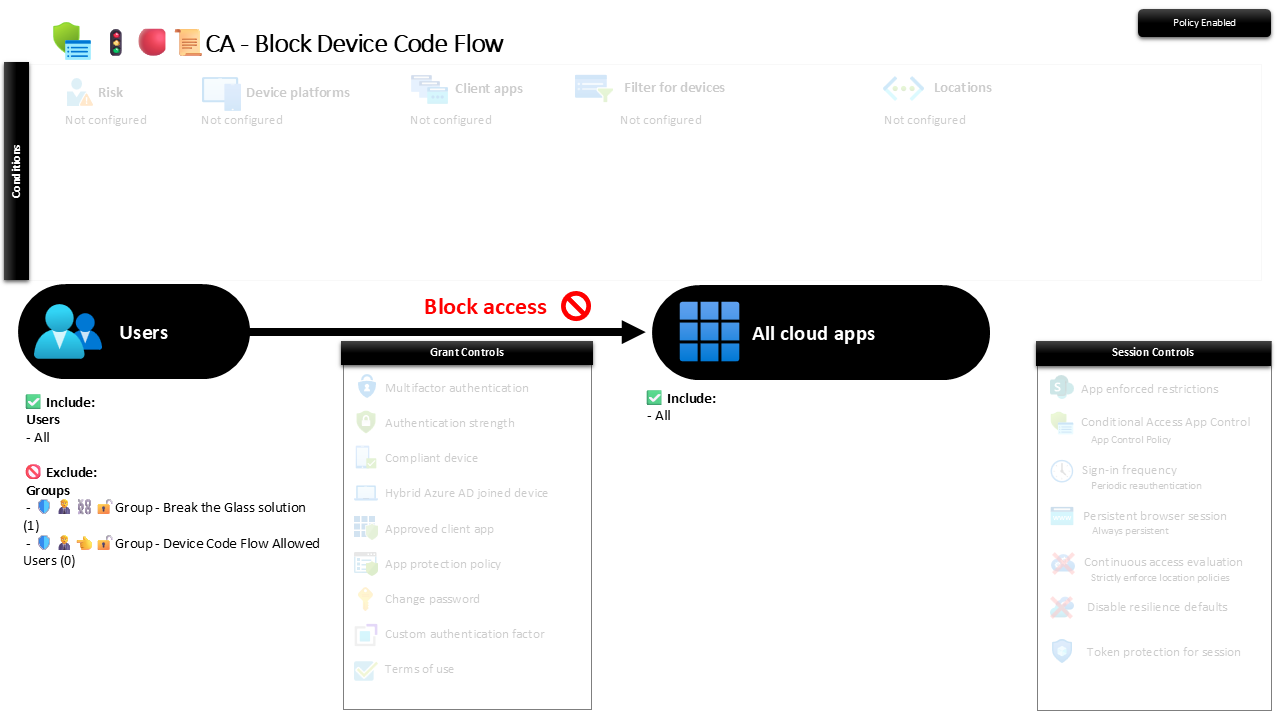
This policy blocks the device code authentication flow for everyone, targeting all cloud apps, with a tight exception group for the rare CLI or kiosk that genuinely needs it. If you are not using it on purpose, you should not be reachable through it at all.
The attack needs no fake login page. The phisher starts a device code request against your tenant, sends you the real Microsoft prompt and a real code, and you helpfully authenticate it, MFA included, handing them a live session. There is nothing to spot in the URL because the URL is genuinely Microsoft's.
Why this matters 🕵️
These are the droids you are looking for, and device code flow is the mind trick that walks them straight past the guard. The victim does everything right, real Microsoft domain, real MFA prompt, real code, and the token still lands in the attacker's hands, because the flow was designed to authorise a session for a device that is not the one you are typing on. Consent phishing campaigns lean on it precisely because every credential and MFA control you own waves it through: the person authenticating is the legitimate user, on their legitimate device, approving a request they did not start.
Blocking the flow removes the trick entirely. The genuine headless scenarios in a typical MKB tenant are close to none, and the ones that exist are known, named, and can sit in the exception group. Everyone else loses an attack path they were never using, which is the cheapest kind of hardening there is.
🛠️ Configuration
Where: Entra admin center → Protection → Conditional Access → Policies.
| Setting | Value |
|---|---|
| Users, include | All users |
| Users, exclude | 🛡️🧑💼⛓️🔓🚦Group - Break the Glass solution 🛡️🧑💼👈🔓🚦Group - Device Code Flow Allowed Users |
| Conditions | None configured (the authentication-flow condition scopes this to device code flow) |
| Target resources | All cloud apps |
| Grant | Block access |
| Session | None |
The block is scoped to the device code authentication flow itself, so ordinary browser and app sign-ins are untouched: only that one flow is refused. The allowed-users group is the escape hatch for a real headless dependency, and the screenshot shows it holding zero members, which is exactly where you want it.
Roll it out in Report-only first and read the sign-in logs for device-code hits before you enforce. In most tenants there are none, which makes this one of the safest blocks to flip on. If something does show up, identify the CLI or kiosk behind it, decide whether it belongs, and move it to the exception group before you go live.
Caveats ⚠️
Legitimate uses exist, so scope the exception carefully. Some admin CLIs and provisioning tools default to device code flow. That is what the allowed-users group is for: named, reviewed, and small. If the list grows, the block is quietly undoing itself.
It closes one door, not the corridor. This stops the device code trick, not consent phishing in general. Pair it with MFA for all users and app-consent governance so the other approval-based paths are covered too.
Report-only tells you the blast radius before you feel it. Because genuine use is rare, most tenants can enforce almost immediately, but confirm that with the logs rather than assuming it. A single overlooked provisioning script breaking at go-live is an avoidable ticket.
License and reversibility. Conditional Access is Entra ID P1, included in Business Premium, and no add-on is needed. Clean-revert: set it to Off and device code flow opens again, which is exactly why a disabled version of this belongs in drift detection rather than left as a silent gap.
🔗 Related
- 🚦🔴📜CA - Block Authentication Transfer: the sibling that stops the other session-handoff trick, moving a signed-in session to a second device.
- 🚦🔴📜CA - Block Legacy Exchange Active Sync Clients: another flow that skips modern controls, closed the same way.
- 🚦🟢👨💼CA - MFA for All Users: the identity floor this policy stops attackers from walking around.
If a flow only exists for devices you do not run, the only sign-ins it can serve are the ones you did not start. Turn it off. 📜