🚦🔴📜CA - Block Legacy Exchange Active Sync Clients
MFA is a lock on the front door. Exchange ActiveSync is the back door that still opens on a password. This one bricks it up.
What this policy is about 📜
Exchange ActiveSync is legacy authentication: a username and a password and absolutely nothing else, which is to say it is 2011 with a mail icon. It cannot present an MFA prompt, cannot honour Conditional Access grant controls, and cannot be talked into either. So while your shiny MFA-for-all policy guards the front door, ActiveSync sits round the back and opens on the password alone.
This policy blocks it. Any client trying to reach a mailbox over Exchange ActiveSync is turned away, so the only way in is a modern one that can actually be challenged.
Requiring MFA and leaving legacy auth open is a deadbolt on a door with the window next to it wide open. Attackers know this: they do not phish the endpoint with MFA, they spray passwords at the one that still opens without it. Ship this with the MFA policy or neither is finished.
Why this matters 🕵️
Legacy auth is the thermal exhaust port on your Death Star. The rest of the tenant can be armour plating, MFA, compliant devices, risk policies, the lot, and the whole thing still comes down through the one two-metre gap nobody thought to close. ActiveSync is that gap. Password spray is a numbers game and legacy protocols are where the numbers pay off: an attacker points a list of leaked passwords at an endpoint that cannot prompt for a second factor, and waits. No MFA, no risk evaluation, no CA, just a yes or no on the password, thousands of times a minute, quietly.
Microsoft has retired basic auth across most of Exchange Online, which helps, but "mostly" is not "everywhere", and an old phone or a forgotten mail profile can still try the ActiveSync route. This policy makes the answer a flat no regardless, so you are not relying on a deprecation timeline to close your own back door.
🛠️ Configuration
Where: Entra admin center → Protection → Conditional Access → Policies.
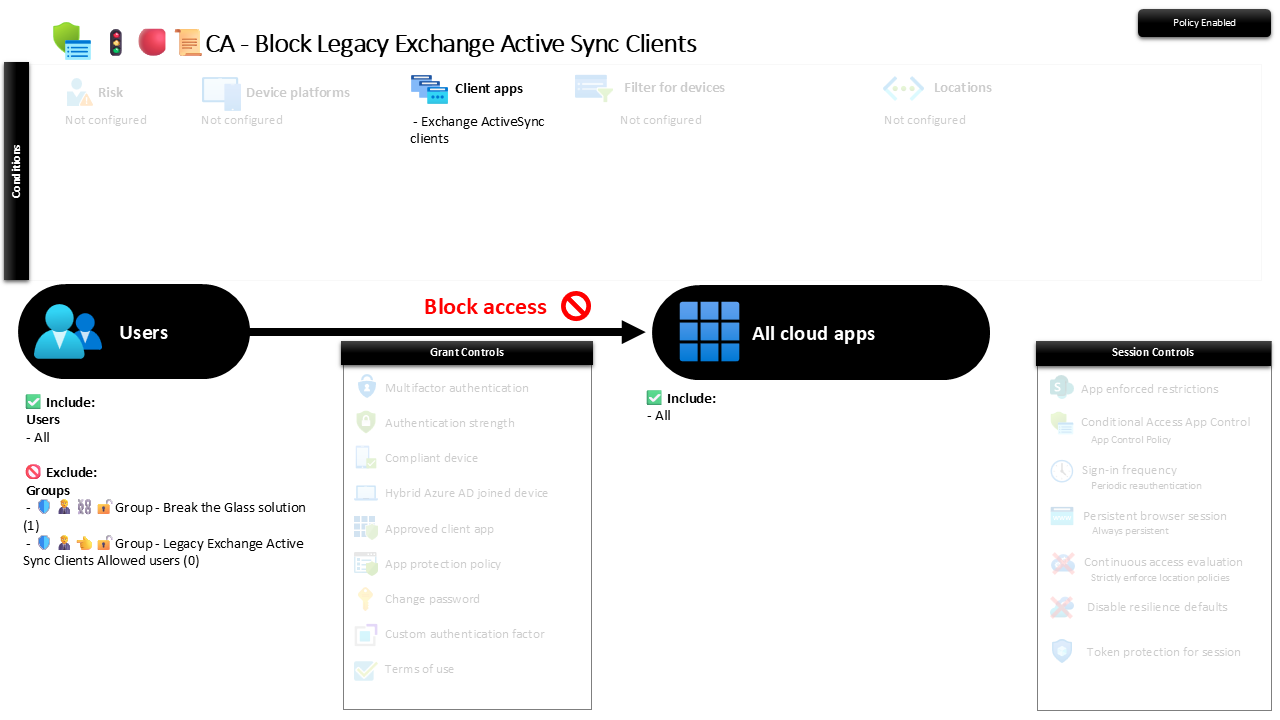
| Setting | Value |
|---|---|
| Users, include | All users |
| Users, exclude | 🛡️🧑💼⛓️🔓🚦Group - Break the Glass solution 🛡️🧑💼👈🔓🚦Group - Legacy Exchange Active Sync Clients Allowed users |
| Conditions, client apps | Exchange ActiveSync clients |
| Target resources | All cloud apps |
| Grant | Block access |
| Session | None |
The allowed-users group is an escape hatch for a genuine legacy dependency, and the screenshot shows it holding zero members, which is exactly where you want it. Keep it that way.
Roll it out in Report-only first and read the sign-in logs: an ActiveSync hit before you enforce is usually an ancient phone still loyally syncing a mailbox like a droid nobody powered down, a multifunction printer scanning to email, or a line-of-business app nobody will admit to owning. Find those, move them to modern auth, then flip to On.
Caveats ⚠️
This is one leg of a three-legged stool. MFA for all users and Block Legacy Other Clients are the other two. Any one on its own leaves a gap the other two were meant to cover.
The escape hatch is kept behind glass. The allowed-users group exists for the one scanner that genuinely cannot do modern auth. It is not a parking spot for "we will fix it later". One member in there is a named, reviewed, time-boxed exception; a growing list is the block quietly undoing itself.
Deprecation is not your control, this is. Leaning on Microsoft having turned basic auth off is fine until the tenant that migrated in from somewhere, or the app that re-enabled it, proves otherwise. Owning the block yourself means it does not depend on a timeline you do not control.
License and reversibility. Conditional Access is Entra ID P1, included in Business Premium. Clean-revert: set it to Off and ActiveSync opens again, which is precisely why a disabled legacy-block belongs in drift detection, that is the back door swinging open with nobody watching.
🔗 Related
- 🚦🟢👨💼CA - MFA for All Users: the front-door lock this policy stops attackers from walking around.
- 🚦🔴📜CA - Block Legacy Other Clients: the sibling that closes the rest of the legacy protocols (IMAP, POP, SMTP and friends).
MFA without a legacy block is a password prompt an attacker never has to see. Brick up ActiveSync and the back door stops being an option. 📜