🚦🔴📜CA - Block Legacy Other Clients
ActiveSync was one legacy door. This is the policy that bricks up all the others, in a single move.
What this policy is about 📜
The ActiveSync block closes one legacy door. This one closes the rest of the corridor. Entra's "Other clients" condition is the catch-all for everything that still authenticates the old way: POP, IMAP, authenticated SMTP, MAPI, the offline address book, older Office builds, scripts wielding basic auth. A whole Sinister Six of protocols, each fluent in exactly one trick, username and password, no second factor, no questions asked.
This policy points a single Block at that entire bucket. One rule, and the back corridor is dark.
MFA for all, block ActiveSync, and this. A three-legged stool: pull any leg and the whole thing tips over, because the attacker simply uses the protocol you left standing.
Why this matters 🕵️
Basic auth is the protocol equivalent of leaving the key in the lock. None of these clients can be challenged for MFA, evaluated for risk, or checked for a compliant device, so every one of them is a password-spray target that answers with a plain yes or no. Authenticated SMTP earns a special mention: it is the favourite for sending mail as a compromised user, the quiet invoice-fraud email that comes from the real address because the attacker is genuinely signed in over a protocol that never learned to say no.
Microsoft has switched most basic auth off in Exchange Online, but "most" leaves edges: a tenant that migrated in with it enabled, an app that turned it back on, a mailbox someone exempted for a printer. Owning the block yourself means the corridor stays dark no matter what the deprecation timeline does.
🛠️ Configuration
Where: Entra admin center → Protection → Conditional Access → Policies.
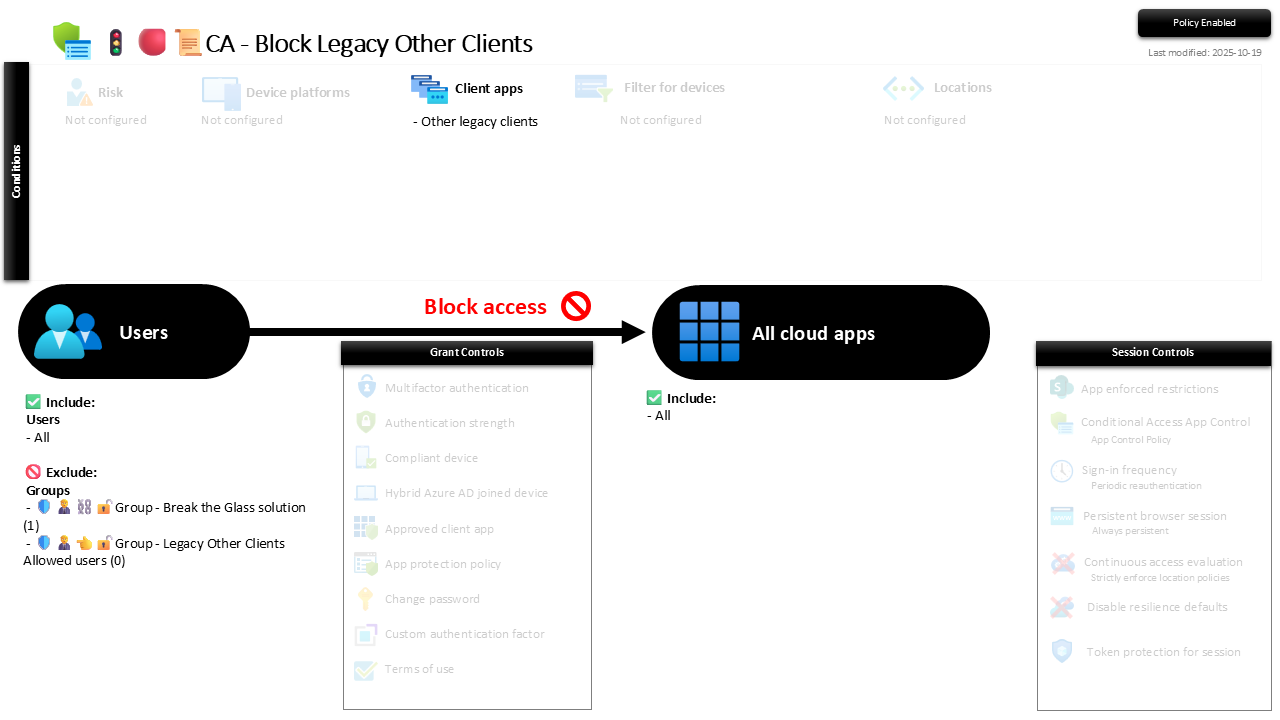
| Setting | Value |
|---|---|
| Users, include | All users |
| Users, exclude | 🛡️🧑💼⛓️🔓🚦Group - Break the Glass solution 🛡️🧑💼👈🔓🚦Group - Legacy Other Clients Allowed users |
| Conditions, client apps | Other clients |
| Target resources | All cloud apps |
| Grant | Block access |
| Session | None |
The allowed-users group is the escape hatch for a real legacy dependency, and the screenshot shows it at zero members. That is the target state; keep it there.
Roll it out in Report-only first. The Other-clients hits before you enforce are usually a scan-to-email relay, a CRM quietly pulling mail over IMAP, or a script that authenticates with a password because it was written when that was normal. Find them, move them to modern auth, then flip to On.
Caveats ⚠️
This is the third leg. MFA for all users and Block Legacy Exchange ActiveSync are the other two. Ship the set, not the single.
Authenticated SMTP is the one that ducks under CA. Conditional Access catches the bulk of the Other-clients bucket, but SMTP client submission does not always evaluate against it. So block it properly at the source too: disable authenticated SMTP tenant-wide in Exchange Online (Set-TransportConfig -SmtpClientAuthenticationDisabled $true) and re-enable per mailbox only for the printer that genuinely needs it. Belt and braces, because the relay printer is exactly the device that will try.
The escape hatch stays behind glass. The allowed-users group is for the one line-of-business app that truly cannot modernise. One named, reviewed, time-boxed member, not a queue. A growing list is the block quietly dismantling itself.
License and reversibility. Conditional Access is Entra ID P1, included in Business Premium. Clean-revert: switch it Off and the whole legacy bucket opens again, which is why a disabled legacy-block belongs in drift detection, that is the corridor lights going out with nobody in the room.
🔗 Related
- 🚦🔴📜CA - Block Legacy Exchange Active Sync Clients: the sibling that handles the ActiveSync door specifically.
- 🚦🟢👨💼CA - MFA for All Users: the front-door lock the whole legacy story exists to protect.
MFA plus one legacy block still leaves a corridor of open doors. Point a single Block at the Other-clients bucket and the last of them shut together. 📜