🚦🔴🚩CA - Block Non-Trusted Countries All Cloud Apps
Some countries have no business signing in to your tenant. This draws the line on the map and turns them away before the password even matters.
What this policy is about 🚩
This policy draws a hard geographic perimeter around the tenant. Any sign-in whose source IP resolves to a country on the 🚩🔴NLOC - Non-Trusted Countries named location is blocked outright, across browsers, mobile apps and desktop clients, for every cloud app in the tenant.
There is no MFA prompt, no risk evaluation, no grant control to negotiate. If the request comes from a flagged country, the answer is no, and it never gets far enough to try a password.
This is a coarse control on purpose. It does not care who the user is or how strong their MFA is: a legitimate employee who lands in a blocked country on holiday is turned away exactly like the attacker you built it for. That bluntness is the feature, but it is also what you plan the rollout around.
Why this matters 🕵️
Most small businesses have a knowable footprint. Their people sign in from the Netherlands, Belgium, maybe a handful of neighbours, and almost never from the far side of the world. Meanwhile a large slice of credential-stuffing, password spray and post-phishing token replay arrives from a short list of geographies your staff will never legitimately touch. Blocking those countries wholesale removes a huge volume of hostile traffic for almost no operational cost, and it does it before any identity control has to fire.
Think of it as the Neutral Zone: cross the border uninvited and you are turned back at the edge, no matter how convincing your papers look. It is not a precision instrument and it will not stop a determined attacker routing through an allowed country, but as a first filter it quietly deletes the noisiest, cheapest attacks and lets your sharper policies concentrate on what is left.
🛠️ Configuration
Where: Entra admin center → Protection → Conditional Access → Policies.
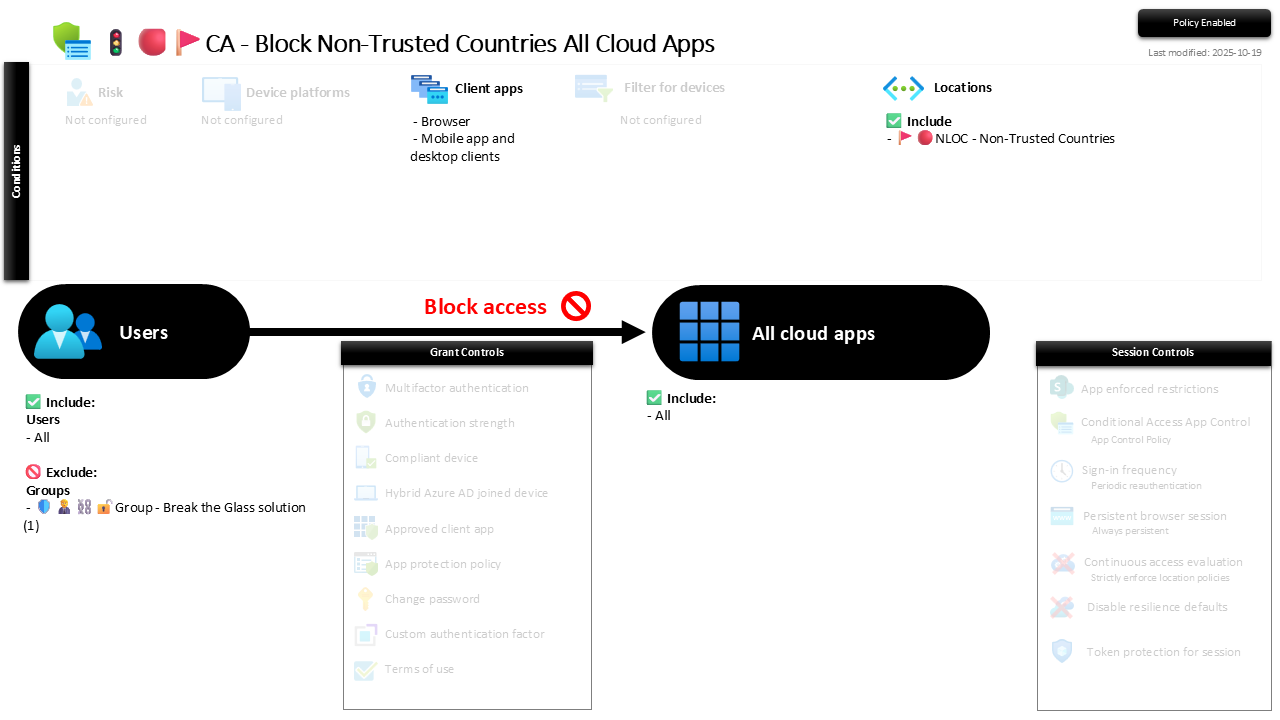
| Setting | Value |
|---|---|
| Users, include | All users |
| Users, exclude | 🛡️🧑💼⛓️🔓🚦Group - Break the Glass solution |
| Conditions, client apps | Browser, Mobile app and desktop clients |
| Conditions, locations | Include: 🚩🔴NLOC - Non-Trusted Countries |
| Target resources | All cloud apps |
| Grant | Block access |
| Session | None |
The whole policy hangs on that named location. It is where you curate the list of countries you never expect a legitimate sign-in from, and this policy simply enforces "if you are in that set, you do not get in". Keep the list under review: geographies change, and so do the places your customers actually travel and work.
Roll it out in Report-only first and read the sign-in logs. A block hit before you enforce is almost always a VPN exit node, a roaming SIM homing to an odd country, or a colleague on holiday somewhere unexpected. Confirm the list matches reality, then flip to On.
Caveats ⚠️
Country data is IP-based, not passport-based. The location comes from the source IP, so a VPN, a corporate breakout in another region, or a satellite link can put a perfectly legitimate user on the wrong side of the line. This blocks where traffic appears to originate, which is not always where the human is standing.
It is a blunt first filter, not a wall. An attacker who routes through an allowed country walks straight past this. Treat it as volume reduction that clears the field for MFA and device compliance, never as a control that stands alone.
Curate the named location deliberately. The perimeter is only as sensible as the country list behind it. Blocking too little achieves nothing; blocking a country a customer quietly outsources to locks out real work. Keep the list owned and reviewed, not set once and forgotten.
License and reversibility. Conditional Access is Entra ID P1, included in Business Premium. Clean-revert: set it to Off and every blocked country can reach the tenant again, which is exactly why a disabled geo-block belongs in drift detection.
🔗 Related
- 🚩🔴NLOC - Non-Trusted Countries: the country list this policy enforces, and where you actually maintain the perimeter.
- 🚦🟢💻CA - Require Compliant Device 🪟: the sharper control that handles the attacks this coarse filter lets through.
- 🚦🟢👨💼CA - MFA for All Users: the identity floor that catches whoever routes in from an allowed country.
The cheapest attacks come from places your staff will never sign in from. Close the border and most of them never reach the door. 🚩