🚦🔴🚩CA - Block Non-Trusted Countries RegSecInfo
Signing in from abroad is one thing. Handing out a fresh MFA method while you are there is quite another. This policy says no to the second.
What this policy is about 🚩
Registering security information is how a user adds or changes the ways they prove who they are: a new authenticator, a phone number, a passkey. It is a powerful moment, because whoever controls the factor list controls the account. This policy targets that exact action and blocks it whenever the sign-in originates from the 🚩🔴NLOC - Non-Trusted Countries named location.
So people can still work from wherever your other policies allow, but nobody gets to enrol a new proof-of-identity while sitting inside a location you have already flagged as hostile.
An attacker who has phished a live session does not want to log in once, they want to stay. The quiet way to stay is to register their own MFA method, so even after you reset the password they walk straight back in. This policy slams that door precisely where the compromise is most likely to be coming from.
Why this matters 🕵️
Account takeover rarely ends at the password. The valuable move is persistence: add a factor you control, and you own the account through every reset the helpdesk will ever run. It is the attacker adding themselves to the transporter authorisation list, so no matter how many times you change the codes, they beam right back aboard. Security info registration is the console for exactly that, which makes it a control point worth guarding rather than leaving open to anyone with a session.
Tying the block to a geographic named location keeps it proportionate. Your users register and change methods from home and the office all day without friction; the block only fires from the countries you have already decided your business has no reason to be operating in. It narrows the persistence window to the ground an attacker is most likely to be standing on, without turning normal self-service into a support ticket.
🛠️ Configuration
Where: Entra admin center → Protection → Conditional Access → Policies.
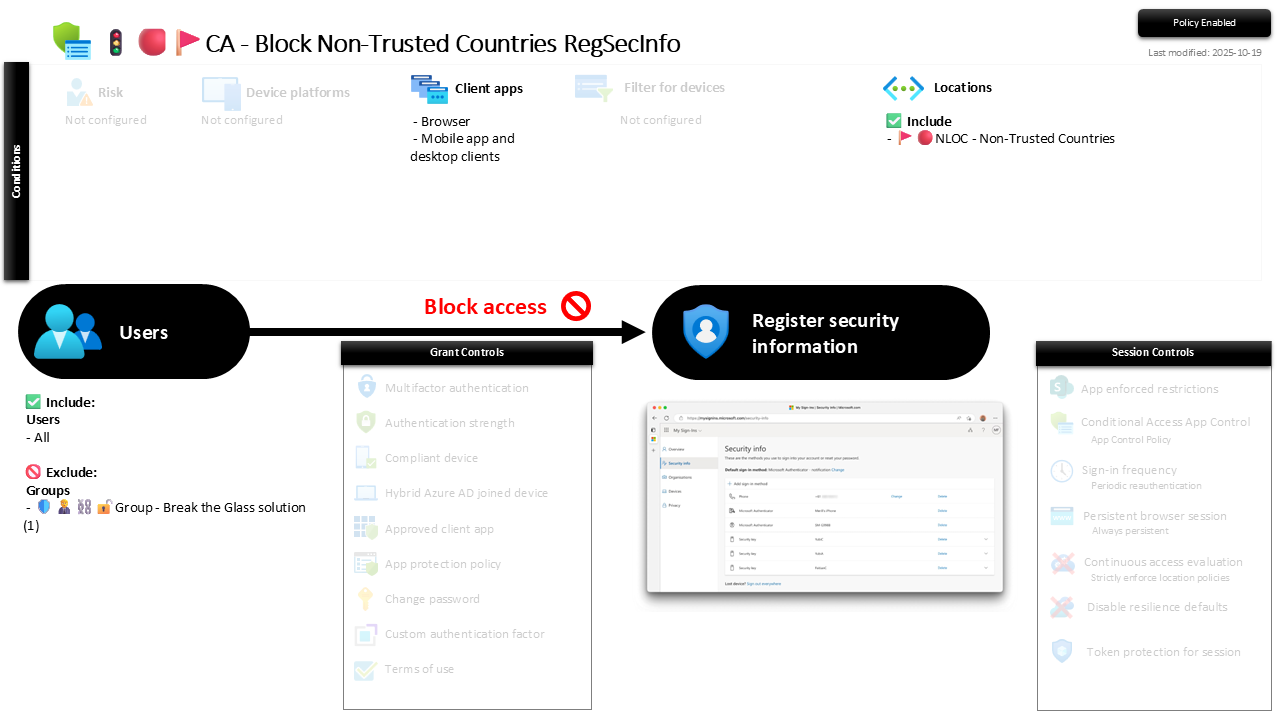
| Setting | Value |
|---|---|
| Users, include | All users |
| Users, exclude | 🛡️🧑💼⛓️🔓🚦Group - Break the Glass solution |
| Conditions, client apps | Browser, Mobile app and desktop clients |
| Conditions, locations | Include: 🚩🔴NLOC - Non-Trusted Countries |
| Target resources | User action: Register security information |
| Grant | Block access |
| Session | None |
The target is the user action, not a cloud app, which is what keeps this surgical: it does not block sign-in from those countries, it blocks only the act of registering or changing security info while there. Everything hangs on the named location being accurate, so treat 🚩🔴NLOC - Non-Trusted Countries as the real control and this policy as its trigger.
Roll it out in Report-only first and check the sign-in logs for anyone legitimately registering a method from one of those countries, a travelling director, an outsourced team, before you flip it to On.
Caveats ⚠️
It only covers the countries you listed. This is a deny from a named location, not a global allow-list. A compromised session from a country that is not in the non-trusted set sails straight past, which is by design; pair it with your broader MFA-for-registration and geo policies rather than expecting it to stand alone.
Location accuracy is the whole game. Named locations resolve on IP, and VPNs, mobile carriers and cloud egress can put a user in the wrong country. Keep the named location curated, and remember a determined attacker on an in-country IP is not caught by this particular net.
First registration still needs a clean path. A brand-new user completing initial security info registration must do it from somewhere allowed. If onboarding ever happens from a flagged country, this policy will block it, so plan enrolment for trusted ground.
License and reversibility. Conditional Access and named locations are Entra ID P1, included in Business Premium. Clean-revert: set it to Off and registration from those countries opens again, which is exactly why a disabled persistence-block belongs in drift detection.
🔗 Related
- 🚦🟢👨💼CA - MFA for RegSecInfo: the twin that demands MFA to register security info everywhere else, where this one hard-blocks it from hostile ground.
- 🚦🔴🚩CA - Block Non-Trusted Countries All Cloud Apps: the broader geo-block on the same named location, for all apps rather than one user action.
- 🚩🔴NLOC - Non-Trusted Countries: the location list this policy stands or falls on.
Passwords get reset; a factor an attacker planted does not, unless you stop it being planted. This is where you stop it. 🚩