🚦🔴💻CA - Block Unsupported Platforms
You support five operating systems. Everything else is a stranger at the door with no name tag. This one turns the strangers away.
What this policy is about 💻
Your device-compliance and app-protection policies are written for five platforms: Windows, macOS, Linux, iOS and Android. Anything else, a Chromebook, a Smart TV browser, a scripted client sending a hand-crafted user-agent string, falls outside every one of them, which means it also falls outside every control you built on top of them. This policy closes that gap by inverting the platform condition: it includes all platforms, then excludes the five you actually support, so what is left is precisely the set nobody manages. That set gets a flat block.
We don't serve their kind here, in other words. If the platform is not one you designed for, it does not get to sign in.
Device platform is derived from the user-agent, which the client sends and can therefore lie about. This is a useful floor, not a wall: it stops the honest unknowns and the lazy scripts, but a determined attacker can spoof "Windows" to skip it. Pair it with device compliance, which checks something the user-agent cannot fake.
Why this matters 🕵️
Every access policy you own makes an assumption about the thing connecting: that it can run the Company Portal, honour an app-protection policy, report a compliance state, present a managed browser. Unsupported platforms quietly break that assumption. A device that cannot enrol cannot be found non-compliant, so a compliant-device grant it never triggers is a control that never fires. The unknown platform slips through the seams between policies that were each written for a world it does not live in.
Blocking the whole unsupported set removes that ambiguity. Instead of leaving unmanaged platforms to land in whatever gap they can find, you deny them at the front and force everything through the five lanes you have actually paved. It is a smaller attack surface for free: fewer client types to reason about, and no long tail of "well, it depends what OS that was".
🛠️ Configuration
Where: Entra admin center → Protection → Conditional Access → Policies.
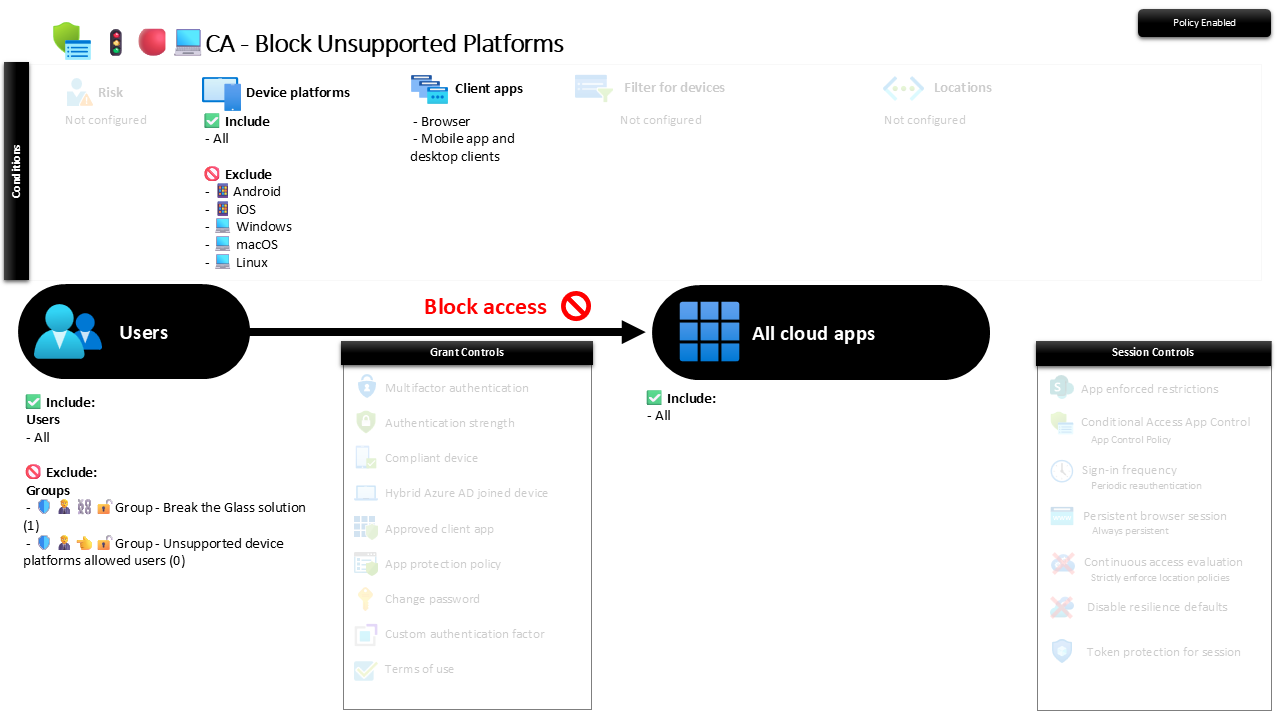
| Setting | Value |
|---|---|
| Users, include | All users |
| Users, exclude | 🛡️🧑💼⛓️🔓🚦Group - Break the Glass solution 🛡️🧑💼👈🔓🚦Group - Unsupported device platforms allowed users |
| Conditions, device platforms | Include All, exclude Android, iOS, Windows, macOS, Linux |
| Conditions, client apps | Browser, Mobile app and desktop clients |
| Target resources | All cloud apps |
| Grant | Block access |
| Session | None |
The include-all-then-exclude-five pattern is the whole trick: the effective target is everything that is not on your supported list, so you never have to enumerate the platforms you want to stop. Add a platform to the excluded five later and it is instantly supported; remove one and it is instantly blocked.
Roll it out in Report-only first and read the sign-in logs. An unexpected hit is usually a Chromebook in a meeting room, a kiosk, or a legitimate service using an odd client. Decide whether each one belongs in the allowed-users group or belongs off the tenant, then flip to On.
Caveats ⚠️
User-agent is a soft signal. Platform detection reads the header the client sends, so this stops honest and lazy clients, not a spoofer who claims to be Windows. Treat it as one layer, with device compliance doing the checking a header cannot fake.
Mind the genuine outliers. ChromeOS, some IoT and meeting-room devices, and the odd line-of-business client can be real and unmovable. That is what the allowed-users group is for: named, reviewed exceptions, not a dumping ground for "something broke, add it here".
All cloud apps means all of them. This blocks the whole app surface for unsupported platforms, which is the point, but it also means a mistake here is loud. Report-only is not optional; confirm the only things being denied are things you meant to deny.
License and reversibility. Conditional Access is Entra ID P1, included in Business Premium. Clean-revert: set it to Off and unknown platforms can reach the tenant again, so a disabled platform-block belongs in drift detection as a widened surface nobody signed off on.
🔗 Related
- 🚦🟢💻CA - Require Compliant Device 🪟: the control that checks the device instead of trusting its user-agent.
- 🚦🔴📜CA - Block Legacy Exchange Active Sync Clients: the sibling block that closes the protocol side of the same gap.
Five supported platforms, one block for everything else, and no more quiet corners where an unmanaged client can slip in unnoticed. 💻