🚦🟢💻CA - Require Compliant Device 🐧
Yes, Linux compliance is a real thing, and no, the one developer on Ubuntu does not get a token-theft exemption. Office 365 only from a compliant Linux device.
What this policy is about 🐧
The Windows and macOS policies, one platform box further down the list. It exists because the developer, the data-science box, or the one stubborn holdout on Ubuntu is reaching the same mailboxes as everyone else, and an attacker's stolen token replays just as happily from Linux. Reaching Office 365 from a Linux client now requires an Intune-compliant device.
Intune does manage Linux, this is not a theoretical policy. Enrolment and compliance run through the Microsoft Intune app and Microsoft Edge, so "compliant Linux device" is a state the tenant can genuinely evaluate, not a hopeful checkbox.
Most tenants write the Windows policy, add the Mac one, and stop. Linux quietly becomes the one platform that can reach Office 365 from anywhere, which is exactly the gap a determined user (or attacker on a Linux VM) will find. Same AiTM defence as the others; the value here is remembering to draw the box at all.
🛠️ Configuration
Where: Entra admin center → Protection → Conditional Access → Policies.
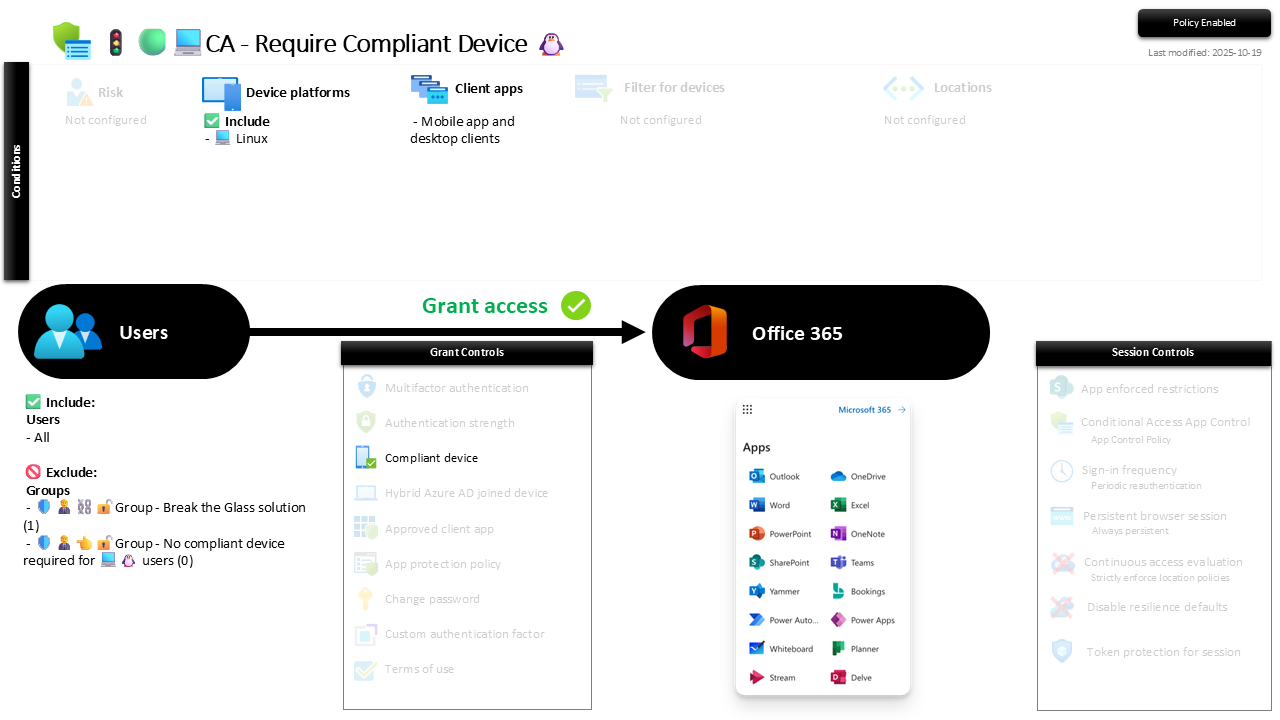
| Setting | Value |
|---|---|
| Users, include | All users |
| Users, exclude | 🛡️🧑💼⛓️🔓🚦Group - Break the Glass solution 🛡️🧑💼👈🔓🚦Group - No compliant device required for 💻🐧 users |
| Conditions, device platforms | Linux |
| Conditions, client apps | Mobile app and desktop clients |
| Target resources | Office 365 |
| Grant | Require compliant device |
| Session | None |
Compliant-only, like macOS, since Hybrid join is a Windows concept. Roll out in Report-only first, because Linux enrolment is the least travelled path and the one most likely to surprise you, then enforce.
Caveats ⚠️
Linux compliance is real but narrower. It covers a defined set of distributions and a smaller list of compliance signals than Windows. Check that your actual Linux estate is supported before you enforce, or the exception group becomes the whole estate.
A blocked user here often means an un-enrolled box. More than on any other platform, a Linux access failure is usually "was never enrolled" rather than "fell out of compliance". Point people at the enrolment path, not at a longer exception list.
Do not skip it because it is one machine. One unmanaged Linux box reaching Office 365 is a full, unmonitored path into the tenant. The blast radius does not scale with the number of Linux users; it only takes one.
License and reversibility. P1 plus Intune, both in Business Premium. Clean-revert, and a disabled Linux policy is the quiet gap nobody notices precisely because nobody was watching Linux in the first place.
🔗 Related
- 🚦🟢💻CA - Require Compliant Device 🪟: the Windows original with the full rationale.
- 🚦🟢💻CA - Require Compliant Device 🍏: the macOS sibling.
- 🚦🟢👨💼CA - MFA for All Users: the identity floor underneath.
The platform you forget to scope is the one that stays open. Draw the Linux box, and there is nowhere left standing outside the fence. 🐧