🚦🟢💻CA - Require Compliant Device 🍏
The Mac in the corner is not exempt from physics. Office 365 from a macOS app client only from an Intune-compliant device.
What this policy is about 🍎
This is the Windows compliant-device policy with a different platform box ticked, and it exists because the designer's Mac is a laptop reaching Office 365 exactly like everyone else's, and a stolen token does not care what fruit is on the lid. Reaching Office 365 from a macOS desktop or mobile client now requires an Intune-compliant device.
The one difference from Windows: there is no Hybrid Azure AD join for Macs, so the grant is compliant-only. On a Mac, "trusted" means "enrolled in Intune and passing its compliance policy", full stop.
The reason is identical to Windows: an adversary-in-the-middle replay of a phished token arrives from the attacker's device, which is not compliant, so it is denied. The only thing platform-specific here is the tendency to forget Macs exist in the fleet. They do, and attackers are delighted when a tenant leaves them unmanaged.
🛠️ Configuration
Where: Entra admin center → Protection → Conditional Access → Policies.
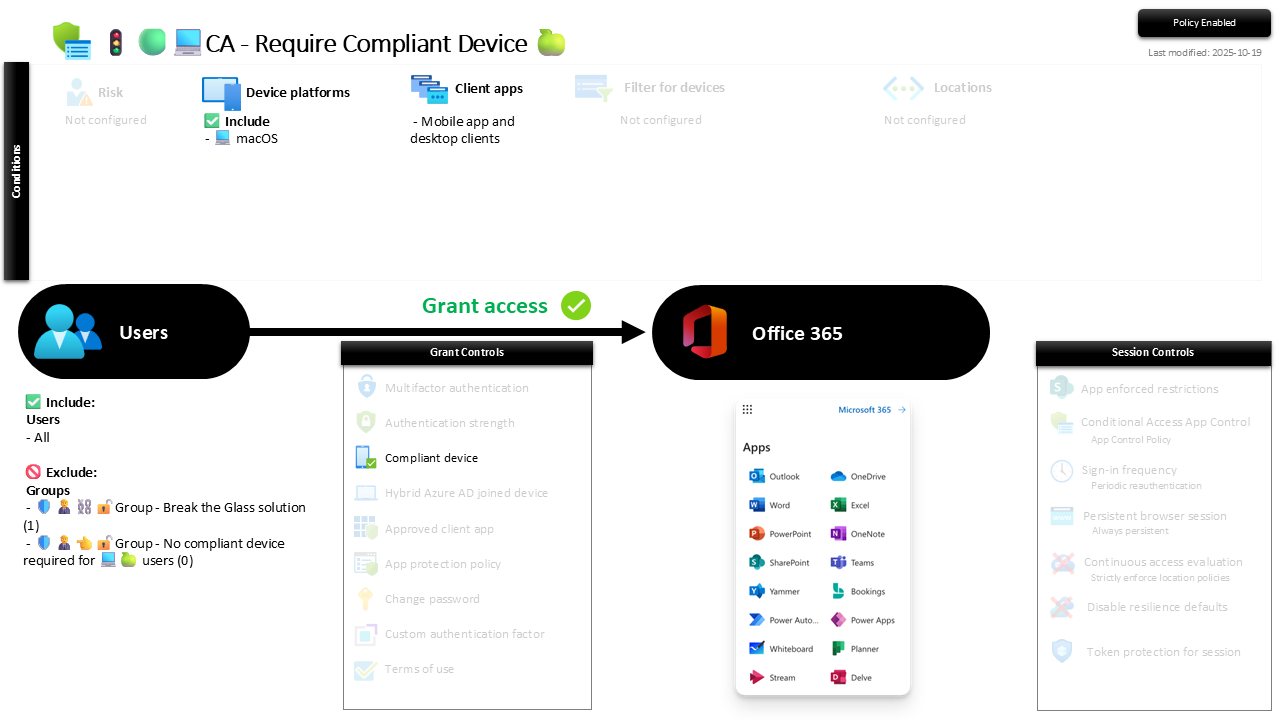
| Setting | Value |
|---|---|
| Users, include | All users |
| Users, exclude | 🛡️🧑💼⛓️🔓🚦Group - Break the Glass solution 🛡️🧑💼👈🔓🚦Group - No compliant device required for 💻🍏 users |
| Conditions, device platforms | macOS |
| Conditions, client apps | Mobile app and desktop clients |
| Target resources | Office 365 |
| Grant | Require compliant device |
| Session | None |
As with Windows, browser access is shaped by the session policies rather than blocked here. Roll out in Report-only until Macs are enrolled and passing compliance, then enforce.
Caveats ⚠️
Macs need a real compliance policy, not a token one. Enforcing "must be compliant" is meaningless if the macOS compliance policy checks nothing worth checking. FileVault, OS version, firewall: give the compliance verdict something to stand on before you trust it here.
No hybrid join, and that is fine. Compliant-only is the correct and only option for Macs. Do not go looking for the hybrid setting that works on Windows; it does not apply, and you do not need it.
The forgotten-Mac problem is the real risk. The most common failure is not this policy misfiring, it is a Mac that was never enrolled, quietly reaching mail on a personal device outside all of this. Inventory the Macs; an unmanaged one is this policy's blind spot.
License and reversibility. P1 plus Intune, both in Business Premium. Clean-revert, so a disabled Mac policy is the drift that lets any unmanaged Mac back to the mailbox.
🔗 Related
- 🚦🟢💻CA - Require Compliant Device 🪟: the Windows original, with the full token-theft rationale.
- 🚦🟢💻CA - Require Compliant Device 🐧: the Linux sibling.
- 🚦🟢👨💼CA - MFA for All Users: the identity floor underneath.
A Mac reaching your mail is a managed device or it is somebody's front door. Require the first and the second stops being an option. 🍎