🚦🟢💻CA - Require Compliant Device 🪟
MFA proves who you are. This proves what you are standing on. Office 365 from a Windows client only from a managed device the tenant actually trusts.
What this policy is about 🖥️
MFA answers "who are you". This answers the question that actually stops modern attacks: "and what are you standing on". Reaching Office 365 from a Windows desktop or mobile app now requires a device that is Intune-compliant or Hybrid Azure AD joined. Anything else, a personal laptop, an attacker's VM, a machine that fell out of compliance, gets a polite no.
You shall not pass, in other words, unless the tenant already knows and trusts the device you are on.
Adversary-in-the-middle phishing steals your password and your MFA token from a fake login page, then replays them. Every credential control waves that replay straight through. This one does not: the replay arrives from the attacker's device, which is not compliant, so it is denied no matter how perfect the stolen token is. This is the single most effective control against token theft in the baseline.
Why this matters 🕵️
Phishing stopped being about passwords a while ago. The good kits proxy the real login, capture the session token after MFA succeeds, and replay it, and from the tenant's side that replay looks exactly like the real user. MFA, sign-in frequency, none of it helps, because the attacker has a legitimately-issued token.
Device compliance breaks that. The token is only honoured when it arrives from a device the tenant enrolled and checked. The attacker's machine is not that device, so the stolen token is a key that fits a lock it can no longer reach. It is the difference between "we require proof of identity" and "we require proof of identity from equipment we manage", and only the second one survives a good phishing kit.
🛠️ Configuration
Where: Entra admin center → Protection → Conditional Access → Policies.
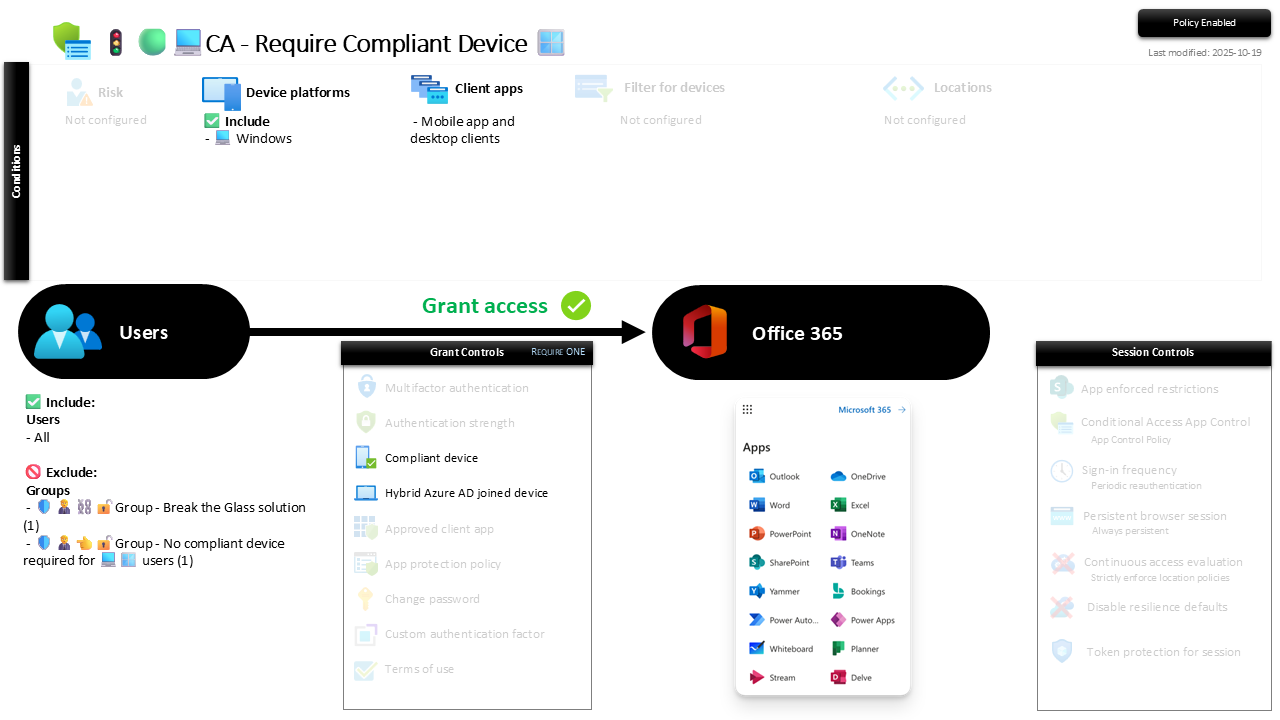
| Setting | Value |
|---|---|
| Users, include | All users |
| Users, exclude | 🛡️🧑💼⛓️🔓🚦Group - Break the Glass solution 🛡️🧑💼👈🔓🚦Group - No compliant device required for 💻🪟 users |
| Conditions, device platforms | Windows |
| Conditions, client apps | Mobile app and desktop clients |
| Target resources | Office 365 |
| Grant | Require one of: compliant device, or Hybrid Azure AD joined device |
| Session | None |
It targets the desktop and mobile app clients on purpose. Browser access from a non-compliant Windows device is not hard-blocked here, it is squeezed with softer session limits instead, see the sign-in frequency and persistent browser policies. Rich clients demand a trusted device; browsers get a short leash.
Report-only is not optional here, it is survival. Enforce this cold and you lock out every user whose device is not yet compliant, which on day one is potentially all of them. Run it in Report-only, confirm devices are enrolling and passing compliance, then flip to On once the green ticks are real.
Caveats ⚠️
Compliance has to actually work first. This policy trusts the compliance verdict. If your Intune compliance policies are thin or misconfigured, "compliant" means less than you think. This is the enforcement; the compliance policies and the built-in secure-by-default setting are the substance behind it.
Hybrid join is the on-ramp for the not-yet-cloud-native. Pure cloud-managed tenants live on "compliant". Hybrid Azure AD joined is included so a tenant still half on-premises is not locked out mid-migration. If you are fully cloud, you can tighten this to compliant-only later.
The exception group is a runway, not a car park. New starters and freshly-wiped machines need a moment to reach compliance. The no-compliant group is where they wait, briefly and named, not where problems go to be forgotten.
License and reversibility. Conditional Access is P1 and Intune compliance is core, both included in Business Premium. Clean-revert, so a disabled device-trust policy is the drift that quietly re-opens the door to any laptop on the internet. Alert on it.
🔗 Related
- 🚦🟢💻CA - Require Compliant Device 🍏 and 🚦🟢💻CA - Require Compliant Device 🐧: the same rule for macOS and Linux.
- 🚦🟢📱CA - Require MAM AppProPol or Compliant Device 🤖: the mobile equivalent, where app protection stands in for full device management.
- 🚦🟢👨💼CA - MFA for All Users: the identity floor this device layer sits on top of.
A stolen token is only useful on a device the thief controls. Require a device the tenant controls, and the theft stops paying off. 🖥️