🚦🟠🚩CA - Require Compliant Device in Less-Trusted Countries
Crossing into less-friendly territory? Fine, but only on a device the tenant already trusts. Everyone else waits at the border.
What this policy is about 🚩
Some countries are not on your block list, but they are not exactly home turf either. This policy watches sign-ins coming from the Less-Trusted Countries named location, and when one shows up it demands a device the tenant actually manages: Intune-compliant or Hybrid Azure AD joined. A personal laptop in a hotel lobby, an attacker's VM, a machine that fell out of compliance, all get turned away the moment the request originates from that geography.
It is the Neutral Zone rule. You can travel through, but not on unknown equipment.
This is a location-scoped device gate, not a hard block. Legitimate travellers and remote staff still get in, provided they are on a managed device. If your workforce genuinely roams through these regions on personal kit, this bites on day one, which is exactly why the named location has to be scoped with intent, not padded out of paranoia.
Why this matters 🕵️
Stolen credentials and replayed tokens do not care where they land, but you can. A password sprayed successfully or a session token lifted through adversary-in-the-middle phishing is often replayed from infrastructure sitting in a handful of predictable regions. Requiring a compliant device from those exact locations means the replay arrives from a machine the tenant never enrolled, so the stolen secret is a key that no longer fits the lock. Identity alone waves the attacker through; identity plus a managed device does not.
It also raises the cost of the easy attack without punishing your own people. A password-only foothold from a less-trusted country is now worthless unless the attacker also compromises a managed endpoint, which is a very different league of effort. You are not blocking a place, you are insisting that presence there be backed by a device you can vouch for.
🛠️ Configuration
Where: Entra admin center → Protection → Conditional Access → Policies.
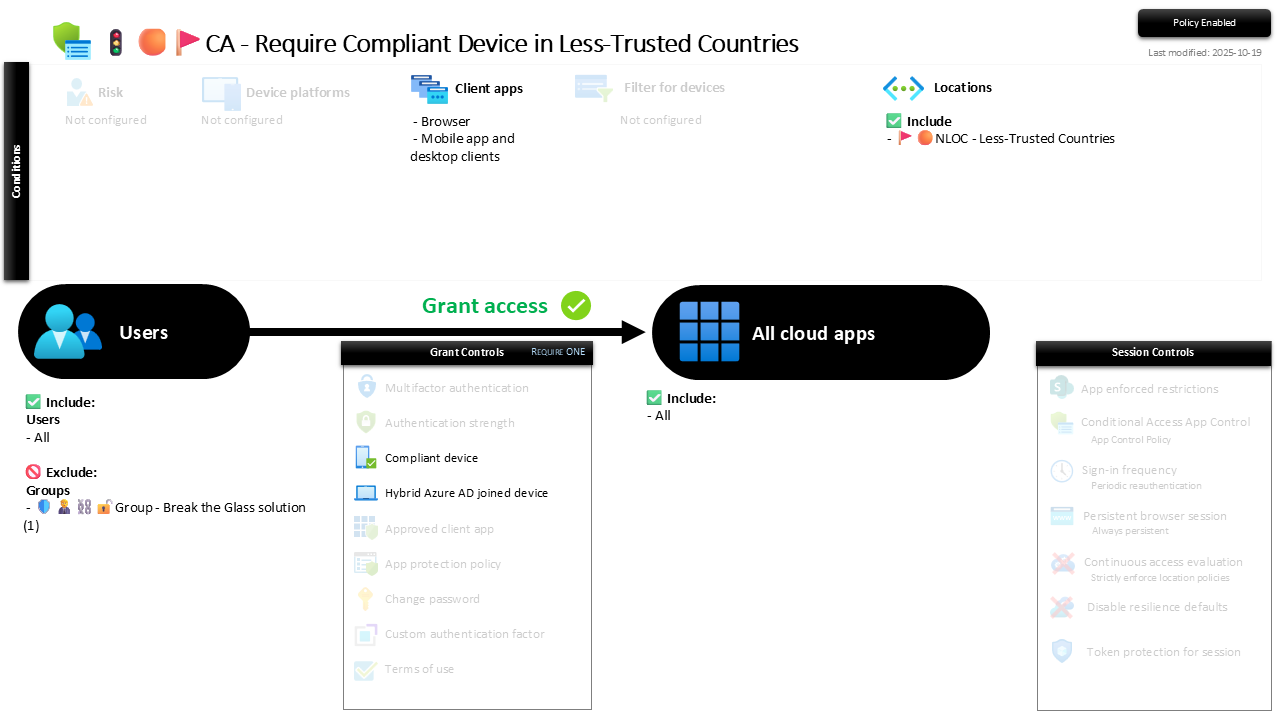
| Setting | Value |
|---|---|
| Users, include | All users |
| Users, exclude | 🛡️🧑💼⛓️🔓🚦Group - Break the Glass solution |
| Conditions, client apps | Browser, plus mobile app and desktop clients |
| Conditions, locations | Include 🚩🟠NLOC - Less-Trusted Countries |
| Target resources | All cloud apps |
| Grant | Require one of: compliant device, or Hybrid Azure AD joined device |
| Session | None |
The location condition is the whole trick: the device requirement only fires when the sign-in comes from that named location, so day-to-day access from home turf is untouched. It targets every client app, browser included, because a geography this specific warrants a harder line than the softer browser session limits used elsewhere.
Roll it out in Report-only first and read the sign-in logs for hits from these countries: a compliant device passing cleanly, a genuine traveller on personal kit who now needs enrolling, or something you did not expect logging in from abroad. Sort those out, then flip to On.
Caveats ⚠️
The named location is the policy. This gate is only ever as good as the country list behind it. A stale Less-Trusted Countries location either over-blocks travelling staff or misses the region an attack is actually coming from. Review it on the same cadence you review the policy.
Compliance has to mean something first. The grant trusts the compliance verdict. If your Intune compliance policies are thin, "compliant" is a rubber stamp and this control inherits that weakness. The enforcement lives here; the substance lives in the compliance policies behind it.
Personal-device roamers are the friction point. Staff who genuinely work from these regions on BYOD will hit a wall unless they enrol or move to a managed device. That is a rollout conversation to have before enforcement, not a support ticket to discover after.
License and reversibility. Conditional Access is Entra ID P1 and Intune compliance is core, both included in Business Premium. No P2 or E5 needed, this is location and device state, not risk scoring. Clean-revert: set it to Off and the geographic device gate lifts, so a disabled version of this belongs in drift detection rather than quietly re-opening the border.
🔗 Related
- 🚦🔴🚩CA - Block Non-Trusted Countries All Cloud Apps: the harder sibling, where the countries are not gated but flatly blocked.
- 🚩🟠NLOC - Less-Trusted Countries: the named location that decides where this policy applies.
- 🚦🟢💻CA - Require Compliant Device 🪟: the tenant-wide device-trust rule this geographic version reinforces.
A stolen password from abroad is only a foothold if it can log in from anywhere. Tie less-trusted geographies to a managed device, and the foothold has nowhere to stand. 🚩