🚦🟢📱CA - Require MAM AppProPol or Compliant Device 🤖
The BYOD-friendly cousin of full device compliance. Office 365 on Android only through a managed app, or from a phone the tenant fully controls. The user's personal photos stay theirs.
What this policy is about 🤖
Requiring a fully compliant device works beautifully on a corporate laptop and terribly on the phone in someone's pocket. Nobody wants their private Android enrolled to the day job, and you do not want the wipe button for their holiday photos. So this policy offers a choice: reach Office 365 from Android either through an approved client app carrying an app protection policy (MAM), or from a fully compliant device. Either satisfies it. Anything else gets a polite no.
That is the whole trick. Corporate control lands on the company data inside the app, not on the whole handset, and BYOD stops being a security hole.
App protection guards the app, not the phone. It keeps corporate mail and files inside Outlook and Teams, encrypted and un-copyable into WhatsApp, but it does nothing about a jailbroken OS or a dodgy keyboard. It is a container around your data, not a health check on the device. That is the trade you are making for BYOD, and it is usually the right one.
Why this matters 🕵️
Say no to personal Android entirely and users route around you: they forward mail to a private account, screenshot the roster, paste the customer list into a chat app, and now your data is somewhere you have zero controls at all. Shadow IT is what happens when the sanctioned path is too painful, and "enrol your personal phone or go without" is exactly that kind of pain.
MAM gives you a sanctioned path that people will actually take. Corporate data lives inside managed Outlook and Teams, protected by a PIN, encrypted at rest, and blocked from leaking into unmanaged apps, while the rest of the phone stays the user's own business. Like Data reciting Starfleet protocol, the app follows the rules precisely without anyone having to seize the whole machine to make it happen. And for the users who do carry a fully managed corporate phone, compliance still counts, so nobody with a locked-down device gets stopped for lacking the MAM path.
🛠️ Configuration
Where: Entra admin center → Protection → Conditional Access → Policies.
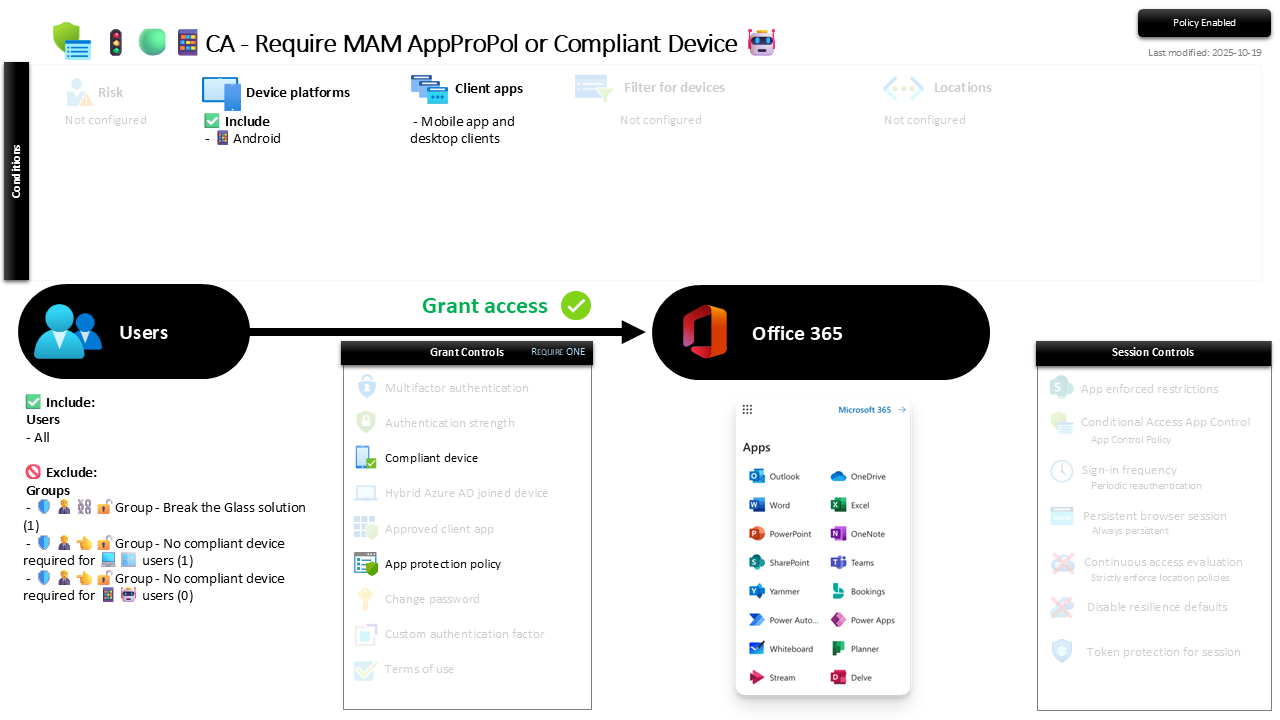
| Setting | Value |
|---|---|
| Users, include | All users |
| Users, exclude | 🛡️🧑💼⛓️🔓🚦Group - Break the Glass solution 🛡️🧑💼👈🔓🚦Group - No compliant device required for 💻🪟 users 🛡️🧑💼👈🔓🚦Group - No compliant device required for 📱🤖 users |
| Conditions, device platforms | Android |
| Conditions, client apps | Mobile app and desktop clients |
| Target resources | Office 365 |
| Grant | Require one of: App protection policy, or compliant device |
| Session | None |
The two grant controls are an OR, not an AND, which is the point: a fully managed corporate phone passes on compliance, a personal phone passes by using a managed app. Every other grant control in the screenshot is greyed out, so MFA and the rest are handled by their own policies and not stacked in here.
Report-only first, always. Enforce this cold and any user whose Android is neither compliant nor running an app protection policy is locked out of mobile Office 365 on the spot. Run it in Report-only, confirm the app protection policies are deployed and phones are actually landing in a managed app, then flip to On.
Caveats ⚠️
App protection needs the policy behind it. This CA rule checks for a MAM verdict; the Android app protection policies are what create that verdict and set the PIN, encryption and copy-paste rules. Without them assigned, "requires app protection" is a gate guarding nothing.
Only managed apps make it through. The path only exists for apps that support app protection: Outlook, Teams, the Office apps, Edge. The stock Gmail app or a native mail client cannot carry the policy, so they get blocked, and that surprises users who never opened Outlook on their phone. Communicate it before you enforce.
MAM is a container, not a compliance check. A rooted device or a malicious keyboard is outside its remit. Where the risk profile demands the whole phone be trustworthy, require compliance instead of accepting MAM, and accept that BYOD gets harder.
License and reversibility. Conditional Access is Entra ID P1 and Intune app protection is core, both included in Business Premium. Clean-revert: set it to Off and unmanaged Android reaches Office 365 again, which is why a disabled mobile-gate belongs in drift detection as a door that reopened with nobody watching.
🔗 Related
- 🚦🟢📱CA - Require MAM AppProPol or Compliant Device 🍏: the identical rule for iOS and iPadOS.
- 🚦🟢💻CA - Require Compliant Device 🪟: the desktop sibling, where full device compliance is the only path because a laptop is not BYOD-in-a-pocket.
- 🚦🟢👨💼CA - MFA for All Users: the identity floor this mobile layer sits on top of.
Corporate data in a managed app, personal phone left alone: BYOD that neither side has to lie about. 🤖