🚦🟢📱CA - Require MAM AppProPol or Compliant Device 🍏
The compliant-device rule, minus the requirement to own the phone. On iOS, a managed work app is proof enough.
What this policy is about 📱
The compliant-device policies work beautifully on hardware the tenant owns. Personal iPhones are a different problem: nobody wants to fully enrol a device they bought themselves, and you cannot demand it. So this policy accepts one of two proofs instead. Reaching Office 365 from an iOS or iPadOS device grants only if the device is Intune-compliant or the user is in an approved app carrying an app protection policy. Either satisfies it; neither, and access is denied.
That second option is the whole point. App protection wraps the work data in its own container on a phone you do not manage, a bit like Doctor Strange's mirror dimension: the work happens in a sealed layer the personal side can see but never touch.
Hard-require compliance on iOS and you have just told every BYOD user to enrol their personal phone, which they will refuse, and rightly. The MAM branch is what makes this shippable: corporate data stays protected, the device stays personal, and access still works.
Why this matters 🕵️
A phished session token is only useful on a device the attacker controls, and their device is neither compliant nor running your managed apps. That is the same token-theft defence the desktop compliant-device policies give you, extended to the one platform where full management is a fight you will usually lose. Without it, iOS is the soft flank: MFA passes, the token is stolen, and it replays from anywhere because nothing checks what it arrived on.
The app protection layer also does work of its own. Even on a device you never enrol, the container blocks copy-paste and save-as out of the work app, so corporate data cannot be quietly siphoned into a personal note, a consumer cloud drive, or a third-party keyboard. You get device-trust for the managed phones and data-loss protection for the personal ones, from a single grant.
🛠️ Configuration
Where: Entra admin center → Protection → Conditional Access → Policies.
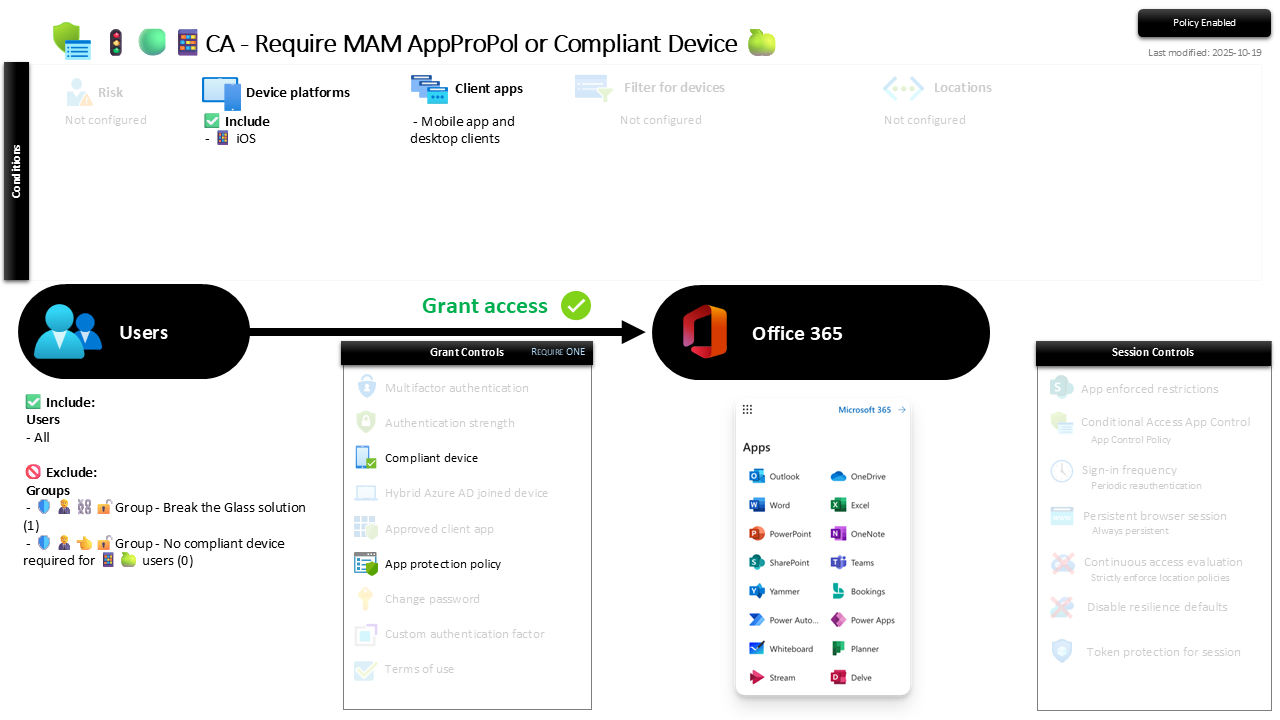
| Setting | Value |
|---|---|
| Users, include | All users |
| Users, exclude | 🛡️🧑💼⛓️🔓🚦Group - Break the Glass solution 🛡️🧑💼👈🔓🚦Group - No compliant device required for 📱🍏 users |
| Conditions, device platforms | Include iOS |
| Conditions, client apps | Mobile app and desktop clients |
| Target resources | Office 365 |
| Grant | Require one of: compliant device, or app protection policy |
| Session | None |
The two grant controls are joined by Require one of the selected controls, so a compliant iPad and a personal iPhone with a protected Outlook both pass. Get that toggle wrong and it becomes an and, demanding both at once, which locks out every BYOD phone you built this policy to accommodate.
Report-only first, always. Enforce cold and any user whose app protection policy has not landed, or whose device is not yet compliant, is out. Run it in Report-only, confirm the managed apps are deployed and the policies are applying, then flip to On.
Caveats ⚠️
MAM is only as good as the app protection policy behind it. This grant trusts that "app protection policy" means a real one. A thin or unassigned policy makes the MAM branch a rubber stamp. The enforcement here needs the app protection policies to carry the actual restrictions.
It only guards the apps that can be managed. App protection covers approved clients like Outlook and the Office apps. Steer users to those; the native iOS Mail app cannot be containerised, which is a good reason to block it separately rather than lean on this policy to cover it.
The exception group is a runway, not a car park. New starters and contractors mid-onboarding sit in the no-compliant group briefly and by name. A growing list is the control quietly hollowing itself out.
License and reversibility. Conditional Access is Entra ID P1 and Intune app protection is core, both included in Business Premium. Clean-revert: set it Off and unmanaged iOS reaches Office 365 again, which is why a disabled mobile-trust policy belongs in drift detection.
🔗 Related
- 🚦🟢📱CA - Require MAM AppProPol or Compliant Device 🤖: the identical rule for Android.
- 🚦🟢💻CA - Require Compliant Device 🪟: the desktop sibling, where full device compliance is the only accepted proof.
- 🚦🟢👨💼CA - MFA for All Users: the identity floor this mobile layer stands on.
Own the phone and prove it compliant, or keep the phone and let the work app prove itself. Either way, the token has nowhere personal to hide. 📱