🚦🟢👨💼CA - MFA for Admin Roles 4h
With great power comes a shorter session. Admins get MFA and a four-hour clock, so a hijacked admin token expires before it can finish the job.
What this policy is about 👑
Uncle Ben was right, and it scales to tenants: with great power comes great responsibility, and in Entra the responsibility is proving who you are more often than everyone else. This policy takes the admin directory roles, requires MFA, and sets a four-hour sign-in frequency, so an admin session cannot just sit there being an admin forever. Every four hours, re-authenticate.
This is the stricter policy that MFA for all users hands off to. That is why admins are excluded there: not a pass, a promotion to tougher rules.
It is not a prompt every four hours while you work. It is a maximum session age: after four hours, the next action re-authenticates. The point is not to annoy admins, it is to make sure a token stolen at 09:00 is scrap metal by lunch.
Why this matters 🕵️
An admin account is the whole tenant with a login. It is what phishing campaigns aim at, because one popped admin is worth a hundred popped users. MFA stops the password-only version of that attack. The four-hour clock handles the next one: token theft, where an attacker lifts a live session and rides it without ever knowing the password.
A normal user session can persist for a long time. For an admin, "a long time" is exactly how long an attacker gets to operate on a stolen token. Capping it at four hours does not stop the theft, but it turns "standing access to your tenant" into "a few hours, then locked out", which is the difference between an incident and a catastrophe.
🛠️ Configuration
Where: Entra admin center → Protection → Conditional Access → Policies.
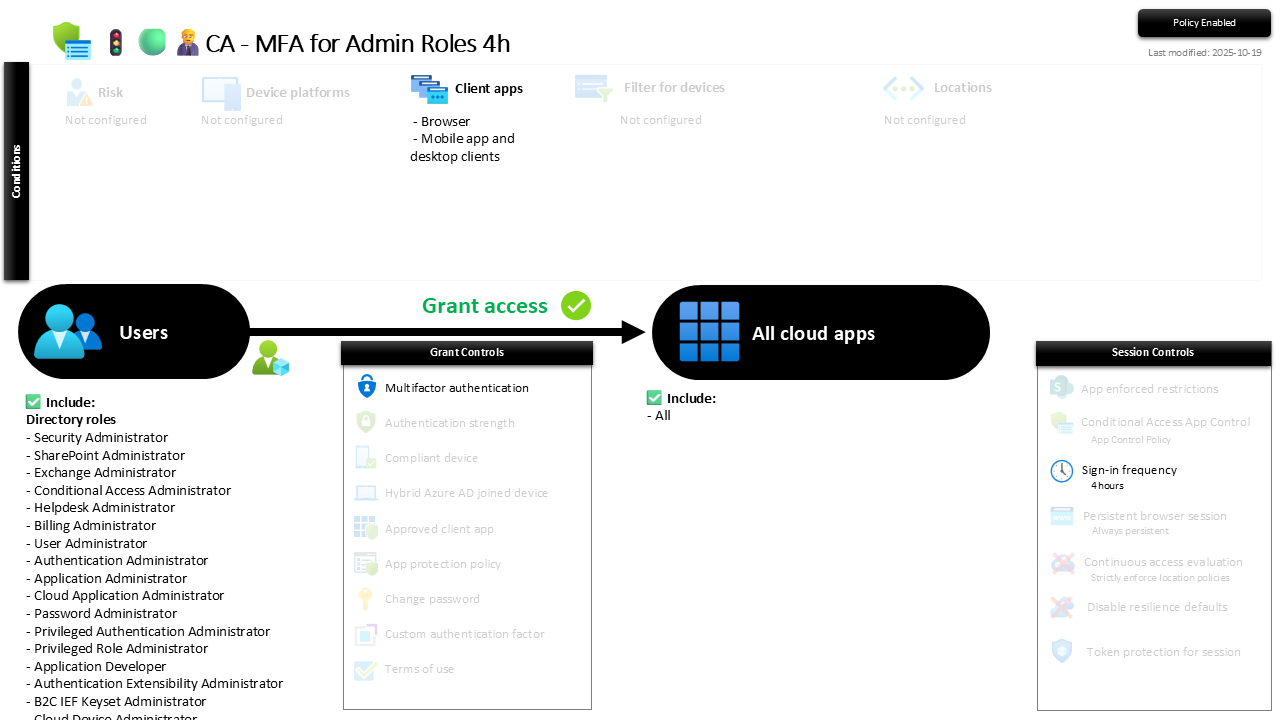
| Setting | Value |
|---|---|
| Users, include | Admin directory roles (the set MFA for all users hands off) |
| Users, exclude | 🛡️🧑💼⛓️🔓🚦Group - Break the Glass solution |
| Conditions, client apps | Browser + mobile app and desktop clients |
| Target resources | All cloud apps |
| Grant | Require multifactor authentication |
| Session | Sign-in frequency, 4 hours |
The most privileged role of all, Global Administrator, gets an even shorter leash on top of this, see the 1-hour high-privilege policy.
Roll it out in Report-only first so you can see the reauthentication cadence before admins feel it, then flip to On.
Caveats ⚠️
Four hours caps the damage, it does not prevent theft. Sign-in frequency shortens the window a stolen token is useful; it does not stop the token being stolen. The controls that do that, phishing-resistant methods and token protection, sit above this on the roadmap. This is the leash, not the muzzle.
Global Admin is handled twice, on purpose. It sits in this policy and the 1-hour one. Conditional Access applies the tightest session control, so Global Admin ends up on the one-hour clock. That overlap is deliberate, not a mistake to tidy away.
Break-glass is out, as always. The emergency accounts are excluded so a four-hour reauth loop can never lock you out of your own tenant during an MFA outage. That is the entire point of break-glass.
License and reversibility. Conditional Access is Entra ID P1, included in Business Premium. Clean-revert: set it Off and admin sessions go back to living forever, which is why a disabled admin-session policy belongs in drift detection.
🔗 Related
- 🚦🟢👨💼CA - MFA for All Users: the baseline this policy is the stricter sibling of.
- 🚦🟢👨💼CA - MFA for Admin Roles with High Priv 1h: the one-hour leash for Global Administrator.
- 🚦🟢👨💼CA - MFA for Admin Portals 4h: the same four-hour rule, scoped to the admin portals instead of the roles.
An admin token that never expires is a spare key to the kingdom left under the mat. Four hours later, this policy changes the locks. 👑