🚦🟢👨💼CA - MFA for Guests
You do not control how a guest's home tenant treats security. You do control that they show a second factor at your door.
What this policy is about 👨💼
Every B2B guest you invite arrives carrying whatever security their home tenant bothered to set up, which might be a hardware key or might be a password from 2015 written on a sticky note. You have no say over that. What you do have a say over is the moment they reach your resources: this policy requires multifactor authentication on any guest or external sign-in, across all external Azure AD organizations, before access is granted. Their posture at home is their business. Your bar at your door is not negotiable.
Your MFA-for-all-users policy targets members, not guests, so without this one your external collaborators can be the softest identities in the tenant. A partner's compromised account walks in on a password because nobody told the door to challenge visitors.
Why this matters 🕵️
Guest accounts are a genuine blind spot. They are real identities with real access to shared sites, Teams and files, but they were provisioned by someone else's IT, or by nobody's, and you inherited the risk the moment you clicked invite. Attackers know external identities are the least-governed door into an otherwise tidy tenant: no compliant-device rule reaches them, their home MFA may not exist, and they often hold standing access to exactly the collaboration spaces that matter. External collaboration is your Mos Eisley cantina, useful, unavoidable, and full of faces you did not personally vet, so you check credentials at the entrance rather than trusting the crowd.
This policy closes the gap without breaking the collaboration. Guests still get in; they just prove a second factor first, satisfied by their own MFA registration if their tenant supports cross-tenant trust, or by registering with yours if it does not. Either way the sign-in that reaches your data has cleared your bar.
🛠️ Configuration
Where: Entra admin center → Protection → Conditional Access → Policies.
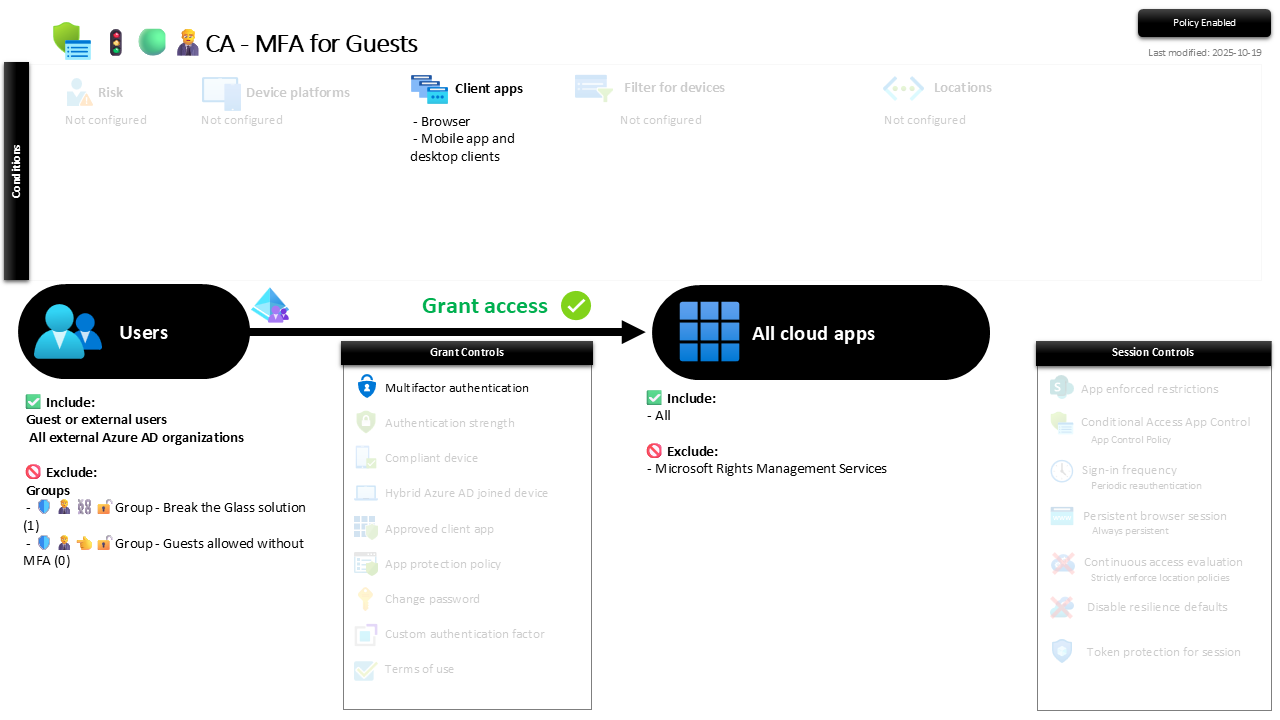
| Setting | Value |
|---|---|
| Users, include | Guest or external users: all external Azure AD organizations |
| Users, exclude | 🛡️🧑💼⛓️🔓🚦Group - Break the Glass solution 🛡️🧑💼👈🔓🚦Group - Guests allowed without MFA |
| Conditions, client apps | Browser, and mobile app and desktop clients |
| Target resources | All cloud apps (excluding Microsoft Rights Management Services) |
| Grant | Require multifactor authentication |
| Session | None |
It targets both browser and rich clients on purpose: a guest opening SharePoint in a browser and a guest on the Teams desktop app should clear the same bar. Microsoft Rights Management Services is excluded from the target so that encrypted-content flows and token bootstrap do not deadlock behind the challenge, which is standard for guest scoping.
Report-only first, always. Run it and read the sign-in logs for a week: you want to see which partners already satisfy MFA cross-tenant and which will hit a registration prompt, so nobody's shared project stalls the morning you flip it On.
Caveats ⚠️
Cross-tenant settings decide the guest experience. Whether a guest reuses their home MFA or has to register with you is governed by your cross-tenant access settings, not this policy. If inbound MFA trust is off, expect first-time guests to register security info before they get through. Set that expectation with the partner, not with the helpdesk queue.
The exclusion group is for named exceptions, not convenience. The screenshot shows 🛡️🧑💼👈🔓🚦Group - Guests allowed without MFA holding zero members, which is exactly right. A guest who genuinely cannot do MFA is a reviewed, time-boxed entry; a growing list is the policy quietly excusing itself.
This is the identity floor, not the whole building. MFA proves the guest is who they claim. It says nothing about the device they are standing on, and device-compliance rules do not reach external identities. Treat guest access to sensitive spaces as something to scope tightly at the sharing layer, not something MFA alone finishes.
License and reversibility. Conditional Access is Entra ID P1, included in Business Premium. Clean-revert: set it to Off and guests sign in on a password again, which is precisely why a disabled guest-MFA policy belongs in drift detection. That is your least-governed identities losing their only challenge with nobody watching.
🔗 Related
- 🚦🟢👨💼CA - MFA for All Users: the same floor for your members, the reason guests need their own policy to match it.
Guests bring their home tenant's security whether it is good or not. This policy makes sure it is at least yours before they touch your data. 👨💼