🚦🟢👨💼CA - MFA for Register or Join Devices
Adding a device to your tenant is a trust decision, not a form to click through. This makes the user prove they are actually holding it.
What this policy is about 👨💼
Registering or joining a device binds a new machine to your tenant identity, and from that moment it can carry tokens, receive policy, and be counted as one of yours. This policy attaches MFA to that exact moment. It does not care which app you are opening or what platform you are on: it targets the Register or join devices user action itself, so the enrolment cannot happen on a bare password.
Only the worthy get to lift the hammer, in other words. A password that leaked yesterday can read mail; it should not be able to quietly plant a device inside your tenant.
Device join is a one-time act with a long tail. Once a machine is registered it stops looking suspicious, so an attacker who can join a device on stolen credentials has laundered a break-in into a "known" endpoint. Gate the join with MFA and that first move costs them the second factor they do not have.
Why this matters 🕵️
Credential theft is cheap and constant, and most policies only care about what happens at sign-in. Device registration is different: it is a foothold. A registered device can be issued a primary refresh token, can be trusted by other Conditional Access rules, and blends into the estate the moment it appears. If that join needs nothing but a password, then every leaked password is also a licence to add hardware to your tenant, which is precisely the kind of thing you find out about three weeks too late.
Requiring MFA on the register or join action closes that off at the source. Enrolment becomes a verified act, tied to a user who could produce a second factor at the time, not just to a string that turned up in a breach dump. It is a small gate on a rare event, and rare high-impact events are exactly where a one-off prompt is worth it.
🛠️ Configuration
Where: Entra admin center → Protection → Conditional Access → Policies.
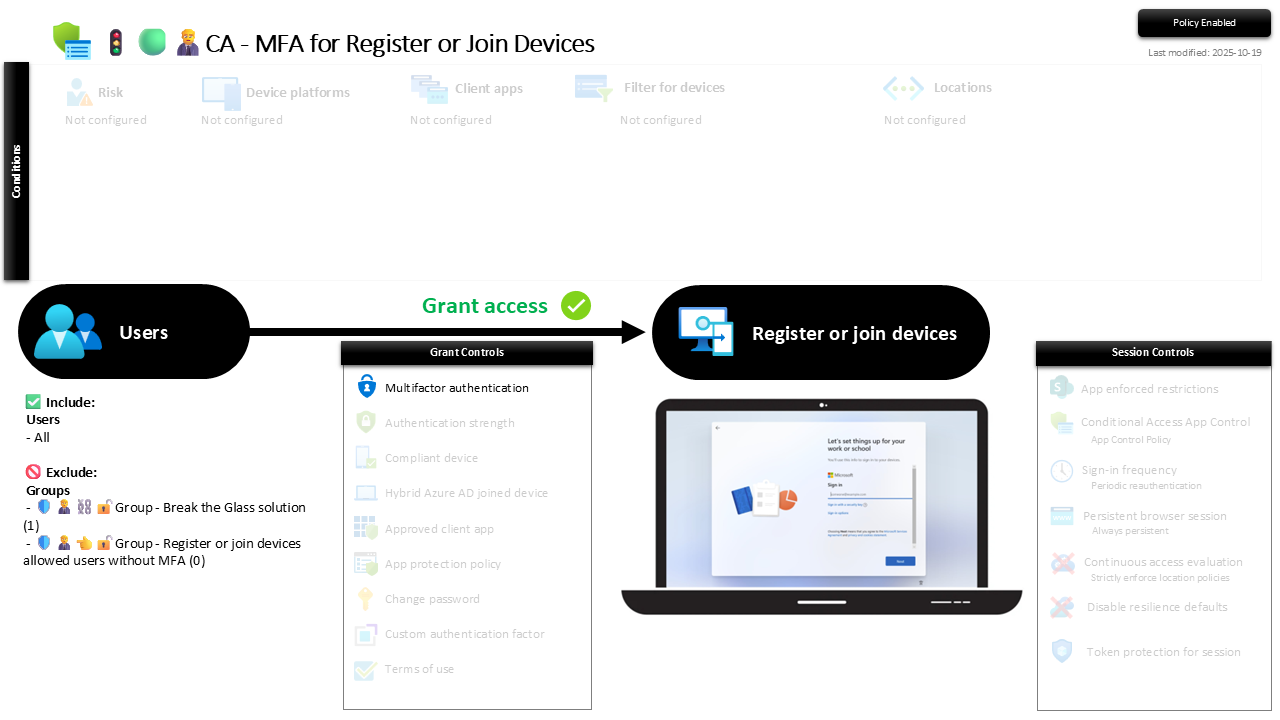
| Setting | Value |
|---|---|
| Users, include | All users |
| Users, exclude | 🛡️🧑💼⛓️🔓🚦Group - Break the Glass solution 🛡️🧑💼👈🔓🚦Group - Register or join devices allowed users without MFA |
| Conditions | None configured |
| Target resources | User action: Register or join devices |
| Grant | Require multifactor authentication |
| Session | None |
The target is a user action, not a cloud app, which is why the whole conditions row sits at Not configured: risk, platform, client apps and location are all irrelevant to the question "is this person really enrolling this device". The exclude list is just the break-glass accounts and a small allowed-users group for the odd headless or shared-provisioning case that genuinely cannot pass the prompt.
Roll it out in Report-only first and watch the join events. In practice almost nobody registers a device on a normal day, so the report window is quiet and the flip to On is uneventful, which is the good kind of boring.
Caveats ⚠️
It only fires at enrolment. This gates the join, not everyday use. A device that is already registered is governed by your other policies; this one has no opinion once the machine is in. Pair it with MFA for all users and the device-trust policies for the day-to-day.
Provisioning at scale needs a plan. Autopilot and bulk enrolment flows can trip over an interactive MFA prompt if you have not accounted for them. That is what the allowed-users group is for: a named, reviewed home for the specific provisioning identity, not a blanket bypass because a rollout hit a snag.
The allowed-users group is not a waiting room. The screenshot shows it holding zero members, which is the correct resting state. Every entry is a real, time-boxed exception with a name on it; a growing list is the MFA gate quietly disabling itself.
License and reversibility. Conditional Access is Entra ID P1, included in Business Premium, and this uses only plain MFA, so no P2 or E5 tier-up is needed. Clean-revert: set it to Off and device join opens on a password again, which is why a disabled register/join policy belongs in drift detection.
🔗 Related
- 🚦🟢👨💼CA - MFA for All Users: the identity floor this action-level gate stands on.
- 🚦🟢👨💼CA - MFA for Register Security Information: the sibling that puts the same one-off MFA gate on registering security info.
- 🚦🟢💻CA - Require Compliant Device 🪟: what a device has to live up to after it has been joined.
Joining a device is a trust decision dressed up as a wizard. Make the user prove they are in the room before the tenant says yes. 👨💼