🚦🟢👨💼CA - MFA for RegSecInfo
Adding a new authenticator is handing out a spare key. This policy makes sure the person cutting it can already prove who they are.
What this policy is about 🔐
Registering security information is the self-service page where users add or swap their own authentication methods: a new authenticator, a phone number, a security key. It is also, from an attacker's point of view, the most valuable page in the tenant, because a method you register is a method you keep. This policy requires MFA before anyone can touch it, so changing the keys to the kingdom means first proving you already hold one. It applies everywhere except your trusted office ranges, where a user setting up their first method on day one is not a red flag.
This is the control that survives a password reset. An attacker who phishes a session and registers their own authenticator is Agent Smith: reset the password all you like, they have already copied themselves into a method you are not watching. Requiring MFA to register slams that door before the second key is ever cut.
Why this matters 🕵️
The first thing a competent attacker does after a successful phish is not read your email. It is open the security info page and register their own authentication method, because that turns a one-time session into permanent access. Once their authenticator is enrolled they pass MFA as the legitimate user, they survive a password change, and they no longer need the phishing kit at all. Persistence is the whole point, and this page is where it gets set up.
Requiring MFA to reach that page raises the bar exactly where it counts. A stolen password alone no longer buys a new method, so the phish has to also satisfy MFA before it can plant its own MFA, which is a far harder trick to pull off quietly. The trusted-location exclusion keeps genuine first-time onboarding from the office friction-free, while everyone registering from the wider internet has to prove themselves first.
🛠️ Configuration
Where: Entra admin center → Protection → Conditional Access → Policies.
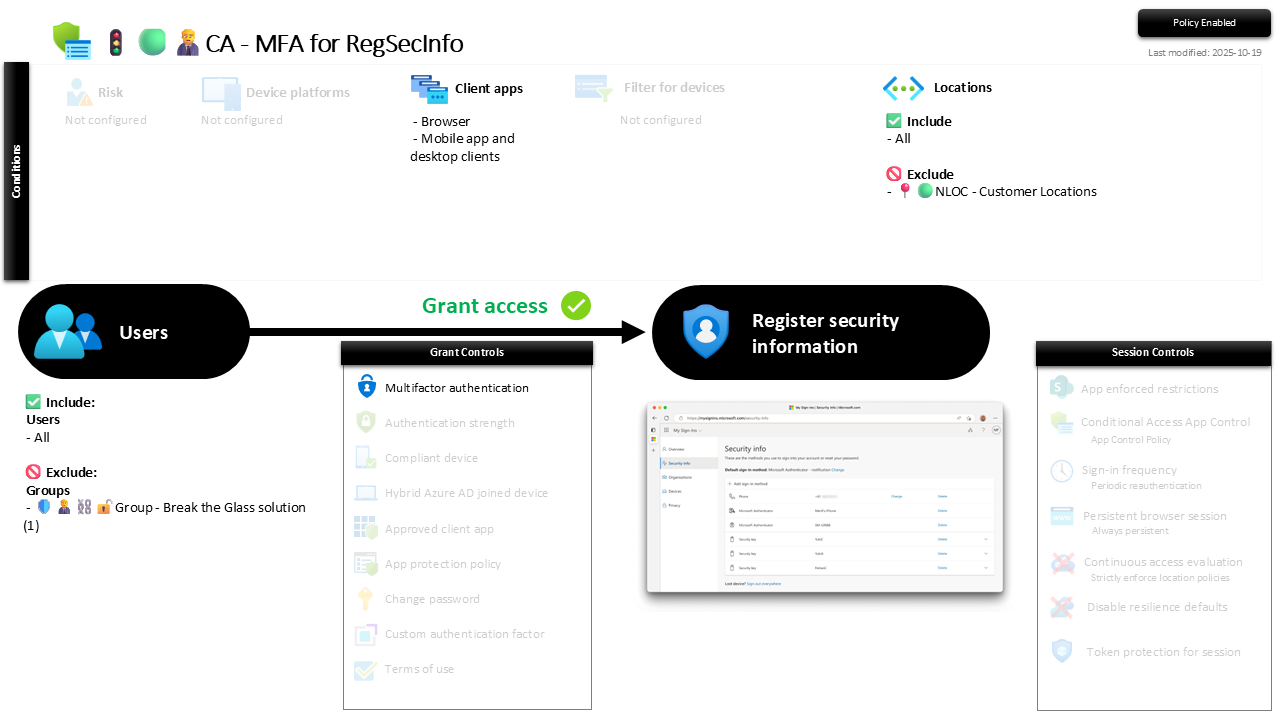
| Setting | Value |
|---|---|
| Users, include | All users |
| Users, exclude | 🛡️🧑💼⛓️🔓🚦Group - Break the Glass solution |
| Conditions, client apps | Browser, Mobile app and desktop clients |
| Conditions, locations | Include All, exclude 📍🟢NLOC - Customer Locations |
| Target resources | User action: Register security information |
| Grant | Require Multifactor authentication |
| Session | None |
The target is a User action, not a cloud app: this fires only when someone opens the security info registration flow, and stays out of the way the rest of the time. The location exclusion is the deliberate soft spot, letting a new starter enrol their first method from inside a trusted office without a chicken-and-egg MFA prompt they cannot yet answer.
Roll it out in Report-only first and confirm the flow works for both cases: an existing user adding a method from outside gets the prompt, a fresh user from a trusted range does not get locked out of onboarding. Then flip to On.
Caveats ⚠️
The trusted-location exclusion is load-bearing. Everything outside Customer Locations needs MFA to register, so if your named location is stale or too broad, you are either blocking day-one onboarding or waving registrations through from the open internet. Keep those IP ranges accurate.
First factor is not first-time enrolment. A user who has never registered any method cannot satisfy an MFA prompt, which is exactly why the office exclusion exists. Remote first-time onboarding needs a Temporary Access Pass or an in-office visit, not a hope that the prompt somehow works.
It guards the page, not the method quality. This controls who may register; it does not decide which methods are allowed. Pair it with sensible Authentication Methods policy so nobody enrols something weak, like SMS, the moment they are through.
License and reversibility. Conditional Access is Entra ID P1, included in Business Premium. Clean-revert: set it to Off and the security info page opens on a password again, which is why a disabled registration-guard belongs in drift detection, that is the spare-key machine left running unattended.
🔗 Related
- 🚦🟢👨💼CA - MFA for Register or Join Devices: the sibling that guards the device-registration user action the same way.
- 🚦🟢👨💼CA - MFA for All Users: the tenant-wide MFA floor this registration guard reinforces at the most sensitive page.
- 📍🟢NLOC - Customer Locations: the trusted ranges that define where first-time enrolment is allowed without a prompt.
Persistence starts the moment an attacker registers their own key. Make them prove themselves first, and the second key never gets cut. 🔐