🚦🟢💻CA - Disable Persistent Browser on Non-Compliant Device
Browser access from an unmanaged device gets a session that self-destructs on close. Stay signed in on your own machine, start fresh on everyone else's.
What this policy is about 🍪
The compliant-device policies hard-block rich clients from devices the tenant does not trust. Browsers get gentler treatment: you are not turned away, you are just not allowed to stay. This policy targets browser sign-ins from any device that is not compliant and not hybrid-joined, and forces the session to be non-persistent. Close the browser, and the "keep me signed in" cookie goes with it.
The stay-signed-in convenience is fine on a device the tenant manages. On a shared reception PC, a home laptop, or an internet cafe machine, a persistent session is a signed-in tab waiting for the next person to sit down.
"Stay signed in?" is a small yes with a long tail. On an unmanaged device that cookie can outlive the user's attention, their session, and sometimes their employment. This policy makes the yes mean "until you close the tab", not "until someone else finds it".
Why this matters 🕵️
Session persistence is the one that looks harmless right up until it is not. A user signs into webmail on a borrowed machine, ticks the box out of habit, closes the lid, and walks off. The token is still valid, still cached, still one browser reopen away from a stranger reading the mailbox. No password needed, no MFA prompt, no alert, because from the tenant's side nothing has gone wrong: a legitimate session is simply still open.
You cannot police every device a user touches, and on Business Premium you should not try. What you can do is refuse to leave anything behind on the ones you do not manage. Compliant and hybrid-joined devices keep their sessions, because those you control. Everything else is treated as a machine you will never see again, which is the safest assumption you can make about a browser you did not enrol. The session becomes a Mission Impossible tape: it works while you are there and erases itself once you leave.
🛠️ Configuration
Where: Entra admin center → Protection → Conditional Access → Policies.
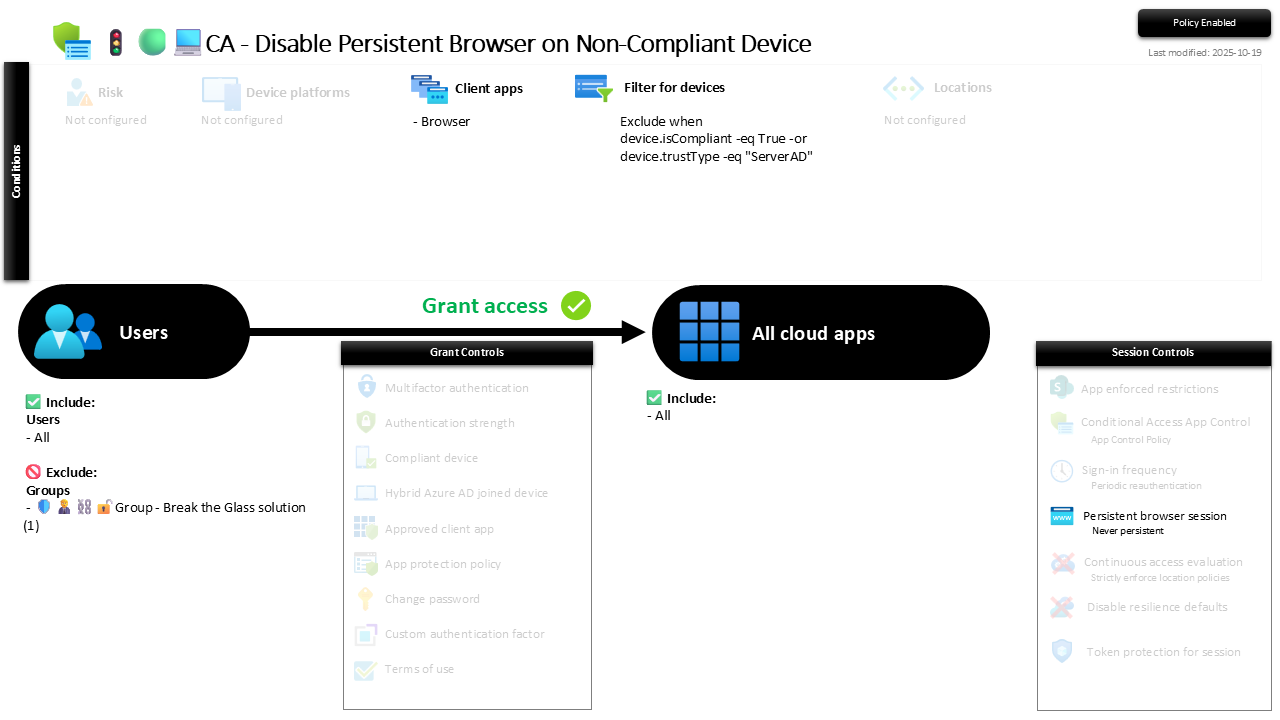
| Setting | Value |
|---|---|
| Users, include | All users |
| Users, exclude | 🛡️🧑💼⛓️🔓🚦Group - Break the Glass solution |
| Conditions, client apps | Browser |
| Conditions, filter for devices | Exclude when device.isCompliant -eq True -or device.trustType -eq "ServerAD" |
| Target resources | All cloud apps |
| Grant | Grant access (no controls required) |
| Session | Persistent browser session: Never persistent |
The filter is doing the real targeting. It excludes compliant and hybrid-joined (ServerAD) devices from the policy, which means the session control only lands on everything else: personal, unmanaged, unknown. Grant has no controls ticked, because the point is not to block, it is to shape the session that gets granted.
Report-only first, though this one is low-drama: read the sign-in logs, confirm it is catching browser hits from non-compliant devices and leaving your managed fleet alone, then flip to On. The worst case is a user having to sign in again, which is the whole idea.
Caveats ⚠️
It squeezes, it does not stop. A non-persistent session is still a session. Someone at the keyboard during the session still has access; this only kills the "come back later without signing in" window. Pair it with Sign-in Freq 1d for Browser on Non-Compliant Device so the live session also has a clock on it.
The filter depends on honest device state. "Non-compliant" only means something if compliance is actually being evaluated. If a device is unenrolled and simply unknown, it correctly falls into this policy; if your compliance policies are thin, "compliant" is a weaker exemption than you think.
Users will notice the re-prompts. On kiosk and shared devices this is exactly right and worth the friction. Set expectations so the extra sign-in reads as intended, not as a bug in the making.
License and reversibility. Conditional Access is Entra ID P1 and the device filter leans on Intune compliance state, both included in Business Premium. Clean-revert: set it to Off and persistent sessions return everywhere, so a disabled session-control policy belongs in drift detection as the cookie jar quietly propping itself back open.
🔗 Related
- 🚦🟢💻CA - Sign-in Freq 1d for Browser on Non-Compliant Device: the twin session control that puts a re-auth clock on the same browser sessions.
- 🚦🟢💻CA - Require Compliant Device 🪟: the hard block for rich clients that this softer browser handling sits alongside.
A stay-signed-in cookie on a machine you will never manage is a spare key under a stranger's doormat. Make the session end when the browser does. 🍪