🚦🟢📱CA - Sign-in Freq 7d for Apps on Non-Compliant Devices
An app session on an unmanaged phone should not last forever. This one gives it a week, then asks who you are again.
What this policy is about 📱
On a compliant, managed phone a signed-in app can stay signed in, because the tenant already trusts the thing it is running on. On a personal phone that never enrolled, that same standing session is a liability: the token lives on a device you cannot wipe, patch or verify. This policy does not hard-block those app sessions, it puts a clock on them. Mobile app and desktop clients on Android and iOS devices that are not Intune-compliant and not Hybrid Azure AD joined get a sign-in frequency of 7 days, so access expires and has to be re-earned every week.
This message will self-destruct in seven days, in other words. The app keeps working; the free ride does not.
The whole policy hides in the filter and the session tab. The grant is just "Grant access" with nothing ticked; the real control is a 7-day timer that only fires when the device fails the compliance check. Miss the filter and you have quietly rate-limited every phone in the tenant, managed ones included.
Why this matters 🕵️
Unmanaged phones are where sessions go to overstay their welcome. A token minted on a personal device can sit there for weeks, surviving a stolen phone, a resold handset with a forgotten mail profile, or a family member who "just needed to check something". You cannot enforce a passcode, a wipe or an OS update on that device, so the one lever you do have is time: shorten how long a session stays valid without a fresh proof of identity.
Seven days is the deliberate middle setting. A hard block would push BYOD users toward workarounds and helpdesk tickets; an unlimited session on an unmanaged device is standing access nobody is watching. A weekly reauth keeps the phone useful while guaranteeing a stolen or abandoned session cannot quietly outlive the person who created it. Pair it with the MAM-or-compliant grant and the browser gets a leash too.
🛠️ Configuration
Where: Entra admin center → Protection → Conditional Access → Policies.
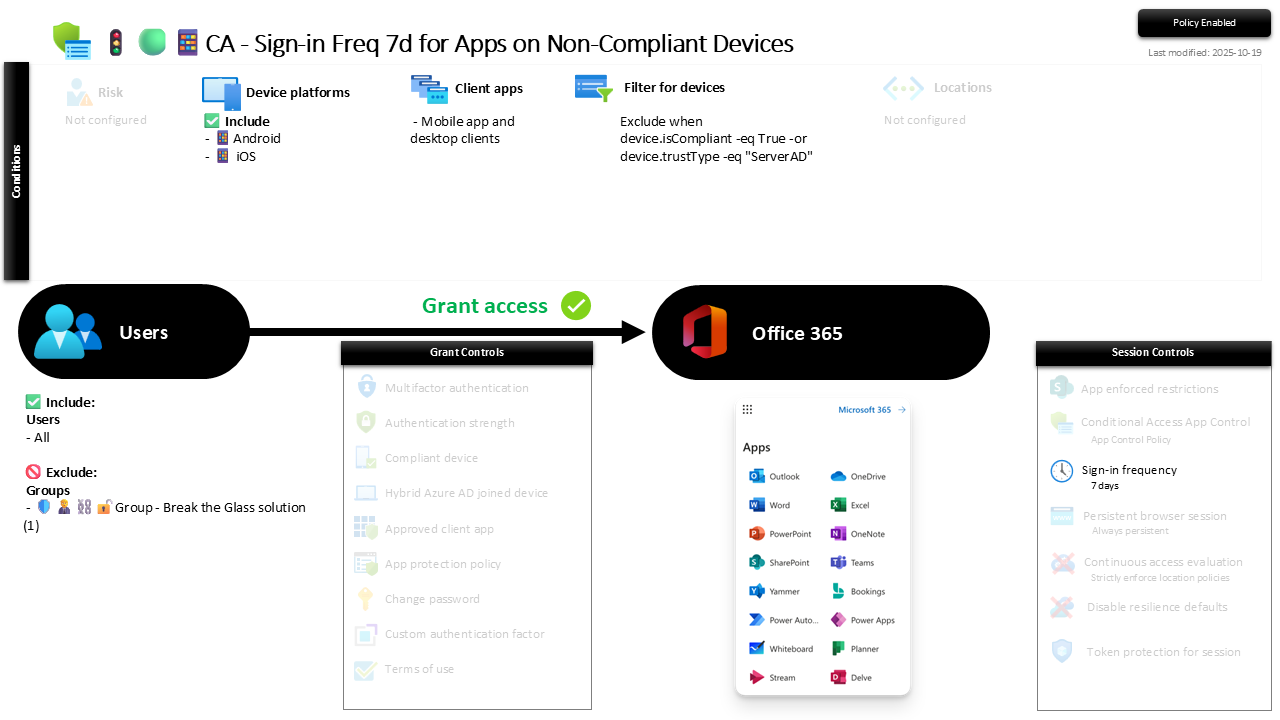
| Setting | Value |
|---|---|
| Users, include | All users |
| Users, exclude | 🛡️🧑💼⛓️🔓🚦Group - Break the Glass solution |
| Conditions, device platforms | Android, iOS |
| Conditions, client apps | Mobile app and desktop clients |
| Conditions, filter for devices | Exclude when device.isCompliant -eq True -or device.trustType -eq "ServerAD" |
| Target resources | Office 365 |
| Grant | Grant access (no controls required) |
| Session | Sign-in frequency: 7 days |
The device filter is the point: it excludes compliant and Hybrid Azure AD joined devices, so the 7-day clock only lands on phones the tenant does not manage. Managed devices sail through untouched. The grant deliberately requires nothing, because the enforcement lives entirely in the session tab, not the grant tab.
Roll it out in Report-only first and confirm the filter is matching only non-compliant Android and iOS app sessions before you enforce, so you are shortening the right sessions and not annoying every managed phone in the fleet.
Caveats ⚠️
It shortens, it does not stop. Sign-in frequency limits how long a session lives, not whether it starts. A phished token still works until the timer trips. This is a containment control that shrinks the blast radius; the MAM-or-compliant grant is the one that decides who gets in at all. Ship both.
The filter is load-bearing. Everything rides on device.isCompliant and device.trustType being read correctly. A typo in the filter rule, or compliance data that has not synced yet, and either every phone gets the timer or none do. Verify it in Report-only against real sign-in logs, not against what you think it says.
Browser access is a different policy. This targets mobile app and desktop clients only. Browser sessions on non-compliant devices are squeezed by the sign-in frequency and persistent browser policies instead. Leave a gap in either lane and access leaks through the one you forgot.
License and reversibility. Conditional Access session controls are Entra ID P1 and the compliance signal is Intune, both included in Business Premium, no P2 or E5 needed. Clean-revert: set it to Off and app sessions on unmanaged phones go back to living indefinitely, which is exactly why a disabled session-limit policy belongs in drift detection.
🔗 Related
- 🚦🟢📱CA - Require MAM AppProPol or Compliant Device 🍏 and 🚦🟢📱CA - Require MAM AppProPol or Compliant Device 🤖: the grant controls that decide who reaches these apps in the first place.
- 🚦🟢💻CA - Sign-in Freq 1d for Browser on Non-Compliant Device: the same clock at a tighter interval, aimed at browser sessions instead of app clients.
An app session on a phone you cannot wipe should expire on its own. Seven days, then prove it is still you. 📱