🚦🟢💻CA - Sign-in Freq 1d for Browser on Non-Compliant Device
The compliant-device policies hard-block the rich clients. This one gives the browser a shorter leash instead of a locked door: sign in fresh every day.
What this policy is about 🕒
The require-compliant-device policies slam the door on the desktop and mobile app clients from unmanaged machines. Browsers are trickier: web access from a personal laptop is often legitimate and useful, so hard-blocking it is heavy-handed. This policy takes the softer route. A browser session from a device that is not Intune-compliant and not hybrid-joined is granted, but only for a day. After that, the user reauthenticates.
The grant carries no extra controls; the teeth are entirely in the session control. It is a leash, not a lock.
This does not stop a session, it ages one out. A token stolen this morning still works this afternoon. What the 1-day frequency buys you is that it will not still work next week, which turns a permanent foothold into a rapidly expiring one.
Why this matters 🕵️
Non-compliant browsers are where the risk concentrates: personal machines, kiosks, a spouse's laptop, none of them enrolled, none of them checked. A refresh token issued there can quietly outlive its welcome for weeks, and a session lifted from one is a standing invitation for exactly that long. Like a redshirt on an away mission, a session from an unmanaged browser should not be expected to last, and a daily reauthentication makes sure it does not.
Forcing a fresh sign-in each day collapses that window. The stolen cookie stops working at the next daily boundary, the attacker has to phish again to keep access, and on a managed device none of this friction applies because the compliance filter excludes it. Trusted equipment gets the smooth ride; the unmanaged browser gets asked to prove itself every morning.
🛠️ Configuration
Where: Entra admin center → Protection → Conditional Access → Policies.
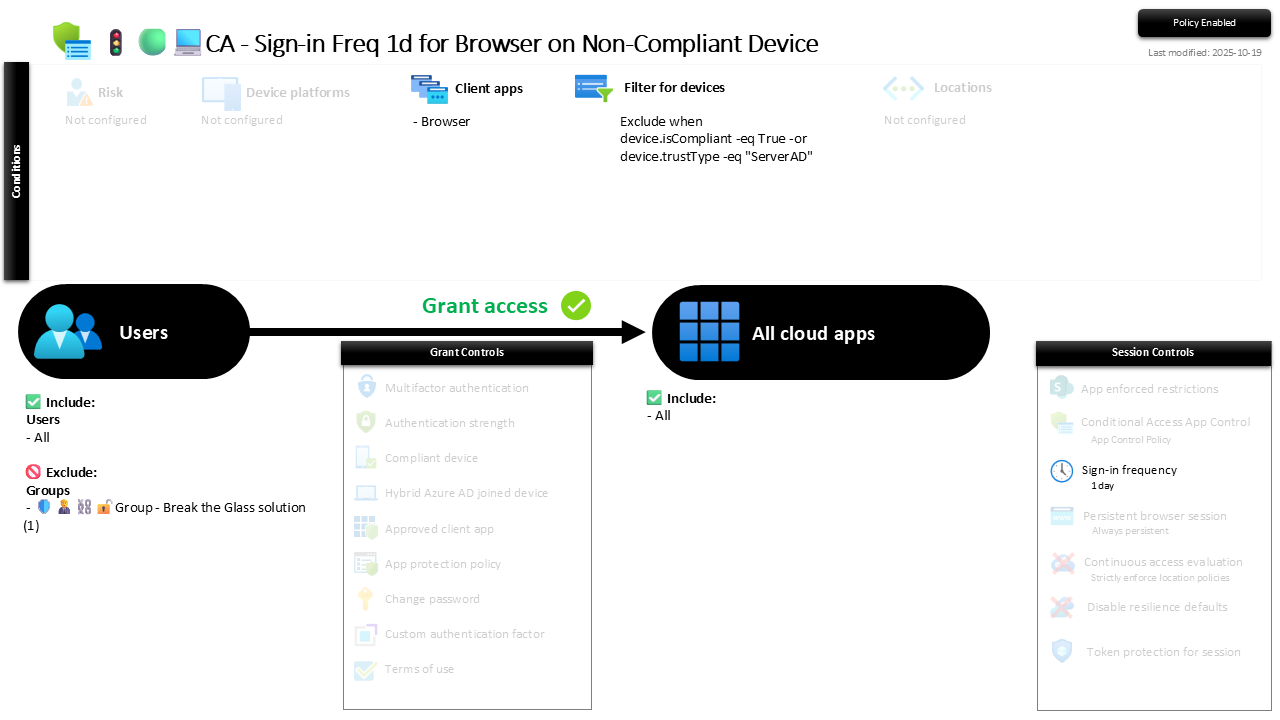
| Setting | Value |
|---|---|
| Users, include | All users |
| Users, exclude | 🛡️🧑💼⛓️🔓🚦Group - Break the Glass solution |
| Conditions, client apps | Browser |
| Conditions, filter for devices | Exclude when device.isCompliant -eq True -or device.trustType -eq "ServerAD" |
| Target resources | All cloud apps |
| Grant | Grant access (no additional controls) |
| Session | Sign-in frequency: 1 day |
The filter is what keeps this precise. Compliant and hybrid-joined devices are excluded from the policy entirely, so a managed machine never sees the daily prompt; only the unmanaged browser does. Grant itself is open, because the point is not to block web access from personal devices, it is to make sure that access does not silently persist.
Roll it out in Report-only first. It rarely locks anyone out, but you want to confirm the filter is matching the devices you expect and that a daily prompt is not landing on managed machines by accident before you flip it On.
Caveats ⚠️
It is a timer, not a wall. Sign-in frequency limits how long a session lives, it does not stop the session being created or hijacked in the first place. Pair it with the persistent browser policy so the same non-compliant sessions also refuse to survive a browser restart.
The filter is load-bearing. If your compliance verdicts are wrong, this either nags managed users or waves through machines it should be squeezing. It trusts the same compliance policies the device-trust policies lean on, so those have to be real first.
A day is a deliberate compromise. One day balances security against not maddening users on legitimate personal devices. Regulated tenants may want it shorter; a helpdesk drowning in prompts may push back. Tune it, but know that shorter is not free.
License and reversibility. Conditional Access sign-in frequency is Entra ID P1 and the device filter reads Intune compliance, both included in Business Premium. Clean-revert: set it to Off and non-compliant browser sessions go back to lasting as long as the token allows, which is precisely the drift worth alerting on.
🔗 Related
- 🚦🟢💻CA - Disable Persistent Browser on Non-Compliant Device: the twin session control that stops these same sessions surviving a restart.
- 🚦🟢💻CA - Require Compliant Device 🪟: the hard-block on the rich clients that this policy softens for the browser.
You cannot stop every session from being stolen, but you can make sure a stolen one does not see next Tuesday. 🕒