🚦🔴📜CA - Block Authentication Transfer
A signed-in session that can hop to a second device is convenient right up until the second device is not yours. This one keeps the session where it landed.
What this policy is about 📜
Authentication Transfer is the feature that lets a session started on one device be handed to another, typically by scanning a QR code: sign in on the desktop, point your phone at the screen, and the phone is now signed in without typing anything. Slick for the user, and a genuinely useful shortcut on shared or kiosk setups. This policy turns it off for everyone by default and blocks the transfer at all cloud apps.
The only accounts that keep it are the ones in the allowed-users group, which the diagram shows sitting at zero members. Off unless there is a documented reason it should be on.
The whole appeal, moving a live session onto a device that never saw the login, is exactly what an attacker wants. A phished or coerced user can beam a freshly authenticated session onto a screen you do not control, and it arrives already past MFA. Block the handoff and the session stays put.
Why this matters 🕵️
Most credential controls guard the moment of sign-in: password, MFA prompt, risk check. Authentication Transfer happens just after that gate, when the session is already legitimate, so it is a lovely way to smuggle a real session past controls that already said yes. Social-engineer a user into scanning a code, or slip the transfer into an attacker-in-the-middle flow, and you have a valid, MFA-satisfied session on a device the tenant never enrolled and never challenged.
It is the Star Trek transporter problem in miniature: the thing that materialises on the other pad is a perfect copy of an already-authenticated session, and the tenant has no way to tell the away team from the impostor. Blocking transfer removes the pad entirely. For the handful of users with a real need, the exclusion group is a deliberate, reviewed exception rather than a tenant-wide open door.
🛠️ Configuration
Where: Entra admin center → Protection → Conditional Access → Policies.
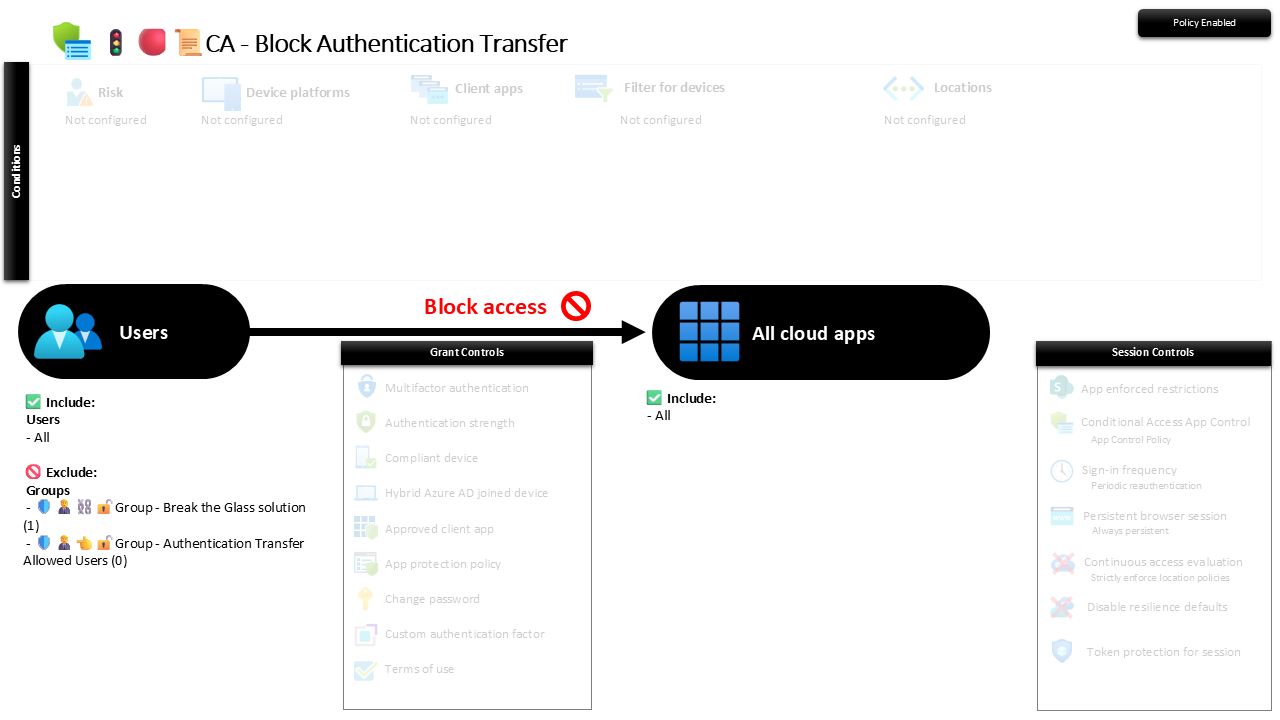
| Setting | Value |
|---|---|
| Users, include | All users |
| Users, exclude | 🛡️🧑💼⛓️🔓🚦Group - Break the Glass solution 🛡️🧑💼👈🔓🚦Group - Authentication Transfer Allowed Users |
| Conditions | None configured |
| Target resources | All cloud apps |
| Grant | Block access |
| Session | None |
There are no platform or client-app conditions here on purpose: the handoff is a session behaviour, not a client quirk, so the block applies everywhere rather than to a named app. The allowed-users group is the single escape hatch, and the screenshot shows it empty, which is exactly where you want it until someone makes the case in writing.
Roll it out in Report-only first and watch the sign-in logs for transfer events: on most tenants there are none, because nobody knew the feature existed. If a genuine workflow surfaces, park that user in the allowed group, then flip to On.
Caveats ⚠️
Zero members is a feature, not an oversight. The allowed group starts empty and should stay empty until a named user has a documented reason. A growing list is the block quietly cancelling itself, one exception at a time.
It sits after the sign-in gate, not before it. This does not replace MFA or device compliance; it closes a specific post-authentication move those controls do not see. Ship it alongside them, not instead of them.
Low blast radius, still Report-only first. Almost nobody uses transfer, so enforcement rarely breaks anything, but "rarely" is not "never". Confirm the logs are quiet before you switch it on, so you are not the one to discover the exception the hard way.
License and reversibility. Conditional Access is Entra ID P1, included in Business Premium. Clean-revert: set it to Off and transfer works again, which is why a disabled session-block belongs in drift detection. A control that silently switches itself back off is worse than one you chose never to enable.
🔗 Related
- 🚦🔴📜CA - Block Device Code Flow: the sibling that shuts the other phishing-friendly handoff, where an attacker feeds the victim a code to authorise.
- 🚦🟢💻CA - Require Compliant Device 🪟: the device-trust layer that stops a stolen session paying off even if one slips through.
A session that can jump devices is only ever one QR code away from jumping to the wrong one. Keep it where it landed. 📜